> ## Documentation Index
> Fetch the complete documentation index at: https://docs.usefini.com/llms.txt
> Use this file to discover all available pages before exploring further.
# Zendesk
> Connect Fini to Zendesk via OAuth and route AI agents by brand and channel to reply on email tickets and chat conversations across your support team.
Connect Fini to Zendesk so your AI agent can read incoming tickets, draft replies, and respond on the brands and channels you choose. Configuration lives entirely on the Fini side once Zendesk is authorized: agent-to-brand mapping, reply timing, and reply-behavior rules are all set from the Zendesk deploy page.
**Two deployment modes.**
* **Full Zendesk integration** (Fini replies on incoming Zendesk tickets and chats): the entire page below applies, including Agent Routing and Reply Settings.
* **Widget-only deployment** (Zendesk is just a destination where the Fini widget escalates conversations): authorize the OAuth connection on this page, then configure the escalation brand and channel under [Widget → Escalate to Zendesk](/en/deploy/widget#escalate-to-zendesk) instead. You can skip Agent Routing and Reply Settings here.
## Before you connect
You'll need:
* A **Zendesk admin account** for the workspace you want to connect (non-admin users can't authorize the integration).
* Your **Zendesk subdomain**. For example, if your Zendesk URL is `https://acme.zendesk.com`, your subdomain is `acme`.
* At least one **agent** already created in Fini. If you haven't created one yet, do that first from [Agent home](/en/configuration/agent-home).
Fini supports Zendesk's multi-brand setup. If your Zendesk has multiple brands, you can map a different Fini agent to each brand. If you only have one brand, the same agent will respond across all incoming traffic.
## What Fini does with your Zendesk
When you authorize the integration, Fini requests the **`read`** and **`write`** OAuth scopes on your Zendesk account. The full list of side effects performed during and after authorization:
* **Read tickets and conversation messages**: required so the agent can understand context and compose replies.
* **Post replies on tickets**: as the authorized user, when a mapped agent decides to respond.
* **Create two custom ticket fields** on your Zendesk account: one used to mark tickets the agent should skip, and one used to mark tickets that have been escalated. Existing fields with the same names are reused.
* **Create webhooks and triggers** that notify Fini when new messages arrive on email and messaging tickets, and when widget tickets are solved.
Fini's Zendesk app is listed on the [Zendesk Marketplace](https://www.zendesk.com/marketplace/apps/support/1139199/fini/), where the full permission set is published in line with Zendesk's app guidelines. We recommend reviewing it before authorizing.
## Connect Zendesk
When you first open the Zendesk deploy page, you'll see the Connection Details panel asking for your subdomain:
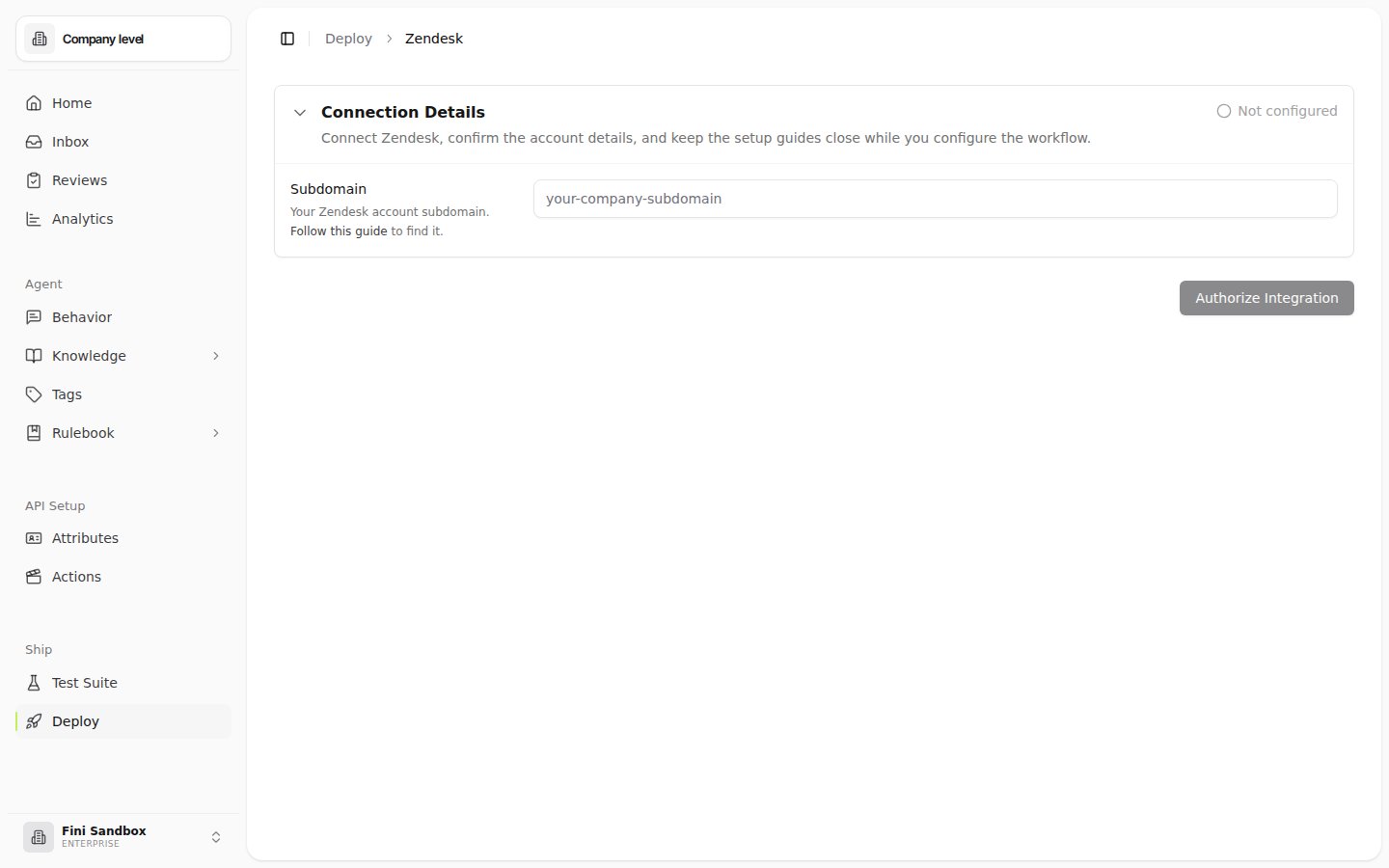 Type the subdomain portion of your Zendesk URL (e.g., `acme` for `acme.zendesk.com`) into the **Subdomain** field.
A Zendesk login window opens. Sign in with your Zendesk admin account and approve the requested permissions.
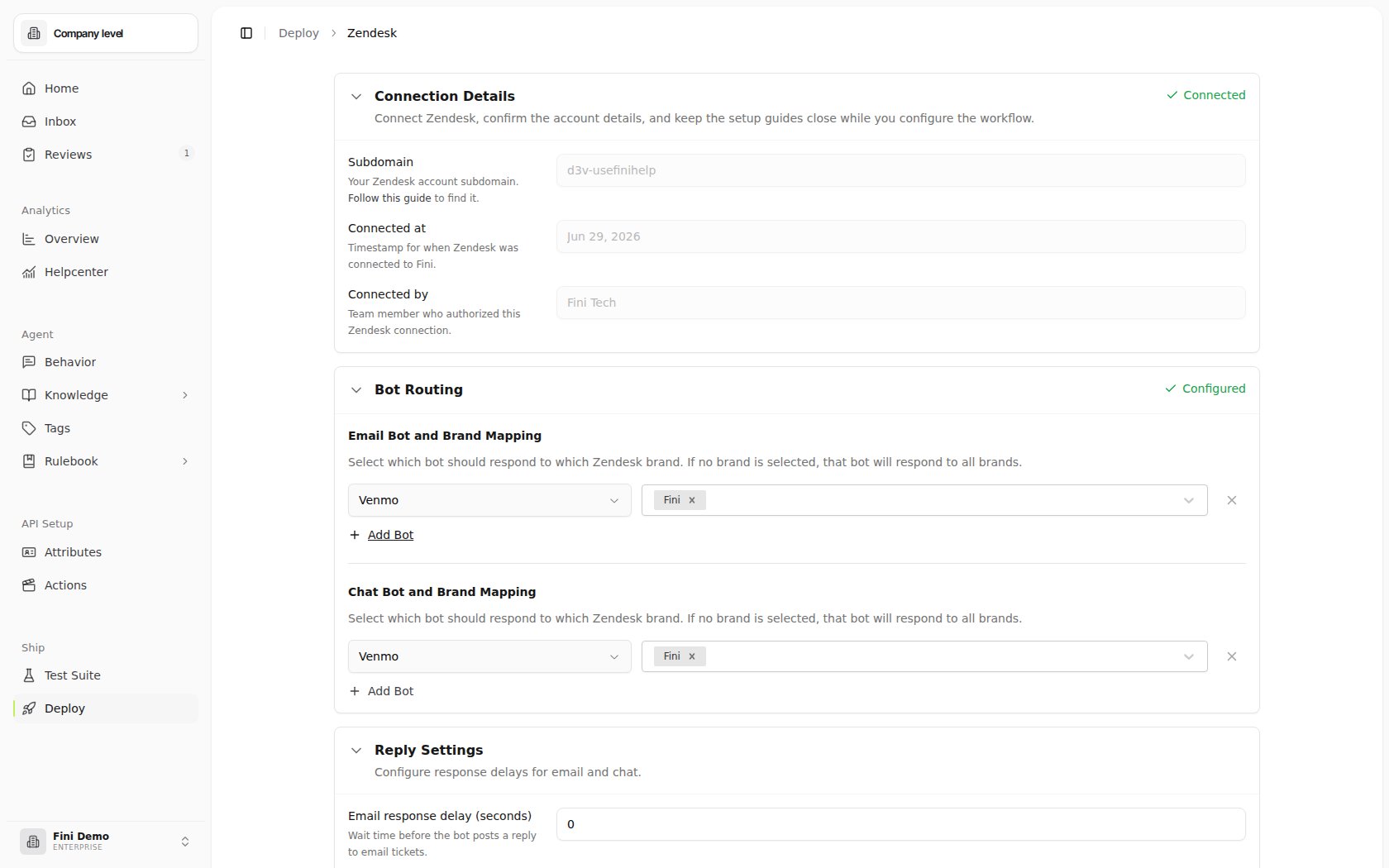
Once Zendesk redirects you back, the page expands to show the full configuration with your connection metadata.
Type the subdomain portion of your Zendesk URL (e.g., `acme` for `acme.zendesk.com`) into the **Subdomain** field.
A Zendesk login window opens. Sign in with your Zendesk admin account and approve the requested permissions.
Once Zendesk redirects you back, the page expands to show the full configuration with your connection metadata.
 ## Configure your deployment
After connecting, three sections appear on the Zendesk deploy page. Each is independent. You can configure them in any order.
### Connection Details
Read-only metadata about the integration:
* **Subdomain**: the Zendesk subdomain Fini is connected to.
* **Connected at**: the timestamp of the most recent successful authorization.
* **Connected by**: the team member whose Zendesk admin account authorized the integration.
If you ever need to swap the connected Zendesk account, disconnect first (see [Troubleshooting](#troubleshooting)) and re-authorize from the new account.
### Bot Routing
Decides which Fini bot replies on which Zendesk brand, separately for **email tickets** and **chat conversations**.
For each channel (**Email Bot and Brand Mapping**, **Chat Bot and Brand Mapping**):
1. Click the bot dropdown and pick the Fini bot that should respond.
2. Click **Select brands** and select the Zendesk brands that agent should respond to.
## Configure your deployment
After connecting, three sections appear on the Zendesk deploy page. Each is independent. You can configure them in any order.
### Connection Details
Read-only metadata about the integration:
* **Subdomain**: the Zendesk subdomain Fini is connected to.
* **Connected at**: the timestamp of the most recent successful authorization.
* **Connected by**: the team member whose Zendesk admin account authorized the integration.
If you ever need to swap the connected Zendesk account, disconnect first (see [Troubleshooting](#troubleshooting)) and re-authorize from the new account.
### Bot Routing
Decides which Fini bot replies on which Zendesk brand, separately for **email tickets** and **chat conversations**.
For each channel (**Email Bot and Brand Mapping**, **Chat Bot and Brand Mapping**):
1. Click the bot dropdown and pick the Fini bot that should respond.
2. Click **Select brands** and select the Zendesk brands that agent should respond to.
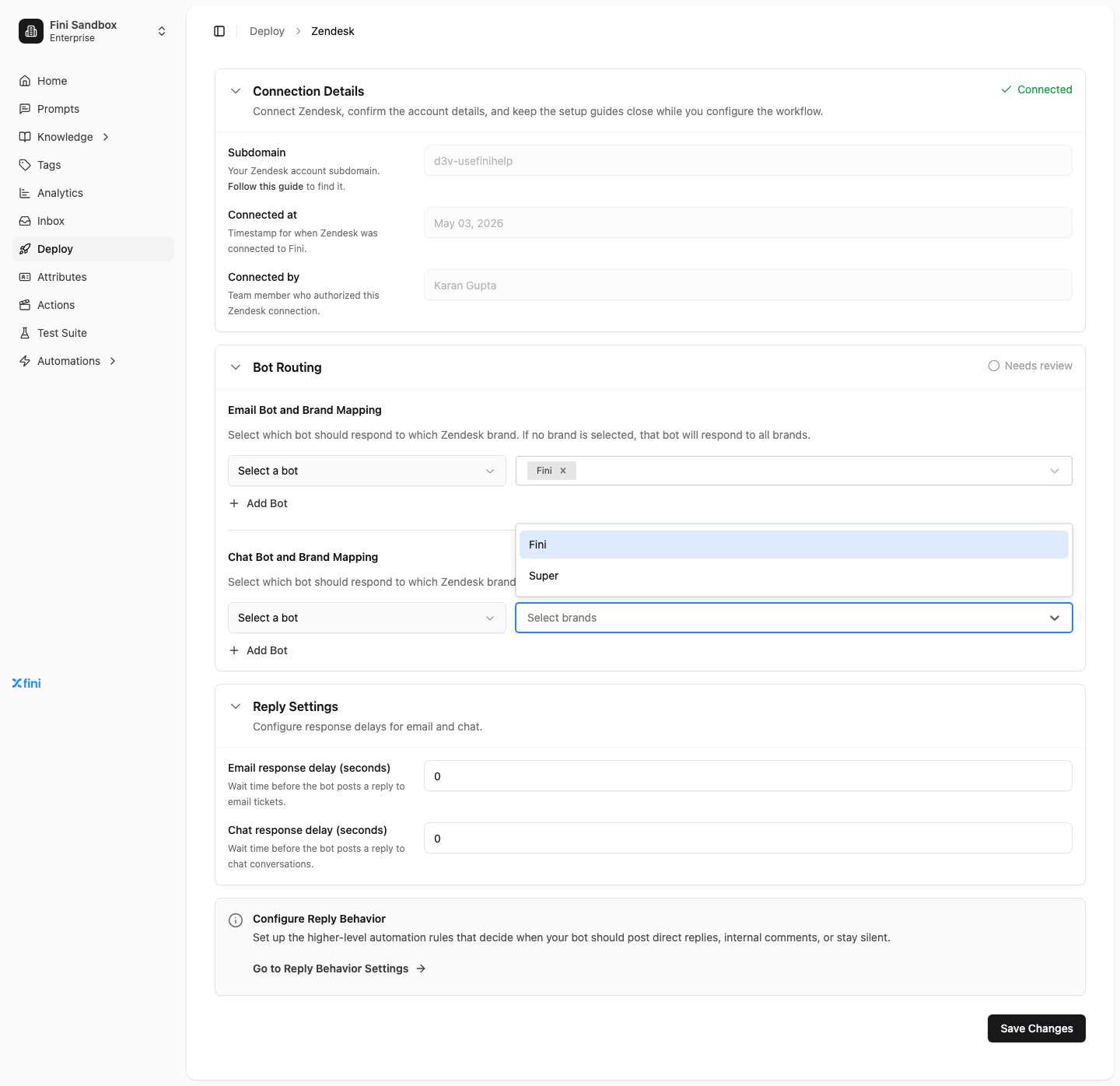 If you leave **Select brands** empty for an agent, that agent will respond to **every brand** on that channel. This is the right setting for single-brand Zendesk accounts.
Click **+ Add Bot** to map additional bots to additional brand sets. Useful when you want different bots for different products or regions.
### Reply Settings
Controls how long Fini waits before posting a reply.
* **Email response delay (seconds)**: wait time before the agent posts on email tickets.
* **Chat response delay (seconds)**: wait time before the agent posts on chat conversations.
Setting `0` makes the agent reply as soon as it has an answer. Higher values can make the agent feel less robotic, or give human agents a chance to take over first.
### Configure reply behavior
Reply Behavior is the higher-level rule layer that decides *when* the agent should post a direct reply, leave an internal note, or stay silent. Click **Go to Reply Behavior Settings** on the Zendesk page to configure these rules. They apply across all channels, not just Zendesk.
### Fini tags → Zendesk tags
The connected Zendesk page also exposes **Fini tags → Zendesk tags**. Use it to map Fini output tags to free-form Zendesk ticket tags so Zendesk views, triggers, and reporting can react to how Fini classified the conversation.
## Verify it's working
1. From your connected Zendesk account, send a test ticket to one of the brands you've mapped.
2. Wait the configured response delay, then check the ticket. The mapped Fini agent should have posted a reply.
3. If nothing appears, see [Troubleshooting](#troubleshooting).
## Troubleshooting
**Authorization failed or expired.** Click **Authorize Integration** again from the Zendesk deploy page. Make sure you're signing in with a Zendesk admin account, not an agent account.
**The agent isn't replying.** Check, in order:
1. Is an agent mapped to the brand the ticket came in on? (Empty brand selector = "all brands"; an explicit brand list excludes everything else.)
2. Is the agent enabled and trained?
3. Is the response delay much higher than expected?
4. Are there [Reply Behavior](/en/automations/reply-behavior) rules that suppress replies on this channel or ticket type?
## Related topics
- [Overview](/en/api-reference/attributes.md)
- [List provider resources](/en/api-reference/list-provider-resources.md)
- [Sources](/en/knowledge/sources.md)
This documentation is built and hosted on [Mintlify](https://mintlify.com), a developer documentation platform.
If you leave **Select brands** empty for an agent, that agent will respond to **every brand** on that channel. This is the right setting for single-brand Zendesk accounts.
Click **+ Add Bot** to map additional bots to additional brand sets. Useful when you want different bots for different products or regions.
### Reply Settings
Controls how long Fini waits before posting a reply.
* **Email response delay (seconds)**: wait time before the agent posts on email tickets.
* **Chat response delay (seconds)**: wait time before the agent posts on chat conversations.
Setting `0` makes the agent reply as soon as it has an answer. Higher values can make the agent feel less robotic, or give human agents a chance to take over first.
### Configure reply behavior
Reply Behavior is the higher-level rule layer that decides *when* the agent should post a direct reply, leave an internal note, or stay silent. Click **Go to Reply Behavior Settings** on the Zendesk page to configure these rules. They apply across all channels, not just Zendesk.
### Fini tags → Zendesk tags
The connected Zendesk page also exposes **Fini tags → Zendesk tags**. Use it to map Fini output tags to free-form Zendesk ticket tags so Zendesk views, triggers, and reporting can react to how Fini classified the conversation.
## Verify it's working
1. From your connected Zendesk account, send a test ticket to one of the brands you've mapped.
2. Wait the configured response delay, then check the ticket. The mapped Fini agent should have posted a reply.
3. If nothing appears, see [Troubleshooting](#troubleshooting).
## Troubleshooting
**Authorization failed or expired.** Click **Authorize Integration** again from the Zendesk deploy page. Make sure you're signing in with a Zendesk admin account, not an agent account.
**The agent isn't replying.** Check, in order:
1. Is an agent mapped to the brand the ticket came in on? (Empty brand selector = "all brands"; an explicit brand list excludes everything else.)
2. Is the agent enabled and trained?
3. Is the response delay much higher than expected?
4. Are there [Reply Behavior](/en/automations/reply-behavior) rules that suppress replies on this channel or ticket type?
## Related topics
- [Overview](/en/api-reference/attributes.md)
- [List provider resources](/en/api-reference/list-provider-resources.md)
- [Sources](/en/knowledge/sources.md)
This documentation is built and hosted on [Mintlify](https://mintlify.com), a developer documentation platform.