> ## Documentation Index
> Fetch the complete documentation index at: https://docs.usefini.com/llms.txt
> Use this file to discover all available pages before exploring further.
# Fini Scout
> An AI coworker that lives in your Slack, it answers product questions, runs reports, debugs issues, and automates recurring work across your connected tools.
Fini Scout is an AI coworker that lives in your Slack. You talk to it the way you'd talk to a teammate, mention it in a channel or DM, ask in plain language, and it does the work: answering product questions, pulling analytics, building reports, debugging customer-facing bots, and reading across your connected tools. It is built on the same knowledge graph that powers your [Slack deployment](/en/deploy/slack) and the rest of Fini, so its answers trace back to your [Articles](/en/knowledge/articles).
 Fini Scout is a different surface from the [Slack deployment](/en/deploy/slack). The Slack deployment puts your customer-facing bot into a Slack channel to answer end users. Fini Scout faces *your team*, it's the internal coworker your CX, ops, and engineering people delegate work to.
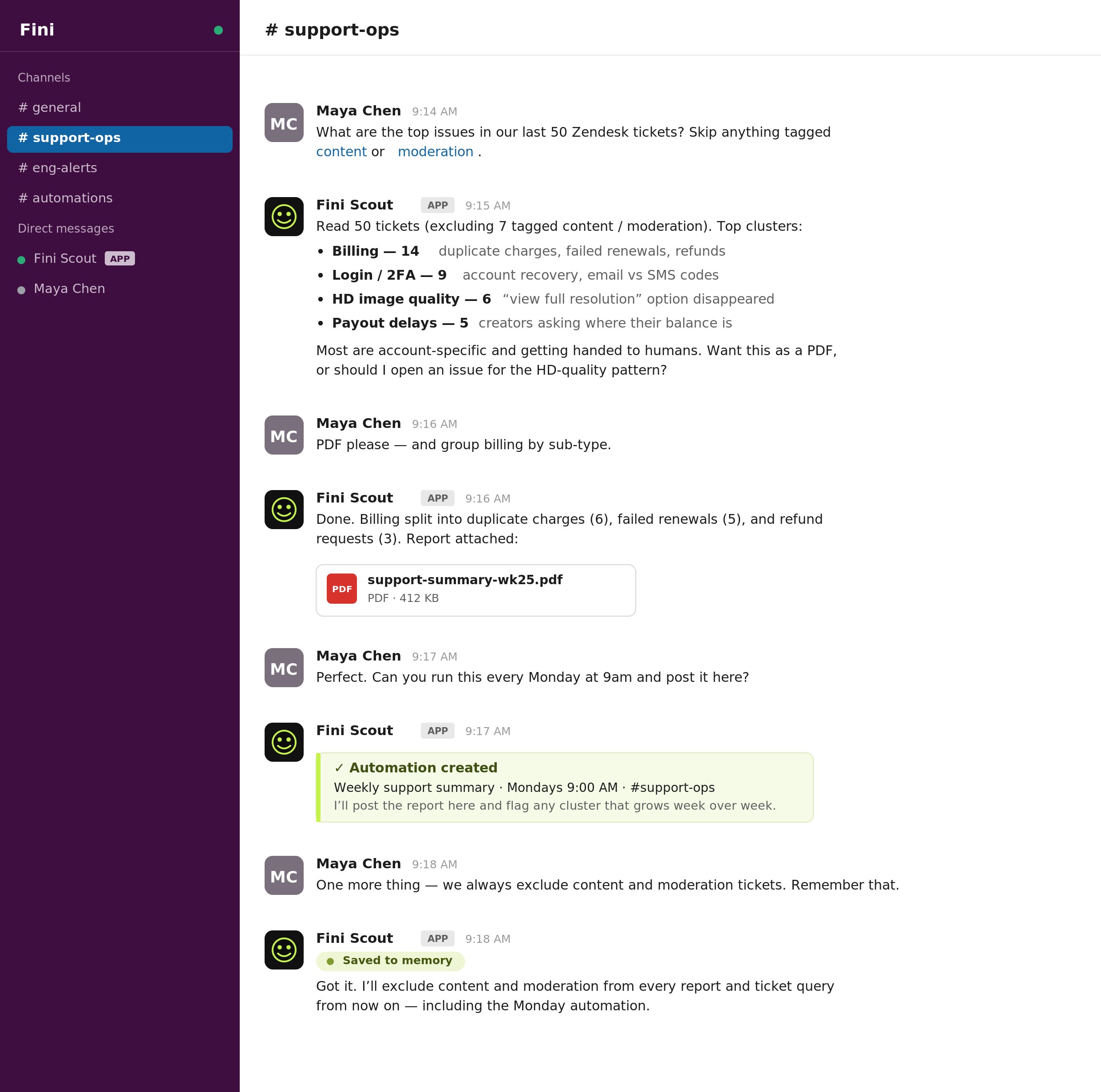
Where a chat widget answers one customer at a time, Fini Scout works at the level of your whole operation: it reads fifty tickets and tells you the top issues, checks a resolution rate for the last two hours, drafts a knowledge article from a thread, or watches your error tracker and pings you only when something breaks.
Think of it as a literal coworker rather than a chatbot. It has memory, so it carries context between conversations. It has automations and heartbeats, so it keeps standing work running and stays quiet until something needs you. It has connectors into the tools your team already uses, so it can investigate across systems the way a teammate would, opening the helpdesk, the issue tracker, and the error log to figure out what's going on.
## What it does
The work people send Fini Scout falls into four kinds. Underneath all of them are three pillars: Connect, Automate, and Learn; that turn it from a chatbot that answers questions into a coworker that can reach into your tools, run standing work on a schedule, and get smarter the more you use it.
Ask anything about your Fini setup, your bots, your knowledge, or your customers' behavior. It traces answers back to source.
Resolution rate, CSAT, tickets touched, retention numbers, ticket categories, as a Slack message or a generated PDF.
Why did the bot escalate, mix languages, or loop? Point it at a conversation and it reads the prompt, knowledge, and trace to explain what happened.
Turn a Slack thread into a knowledge draft, or get a concrete prompt diff. Drafts flow into Review, never auto-published.
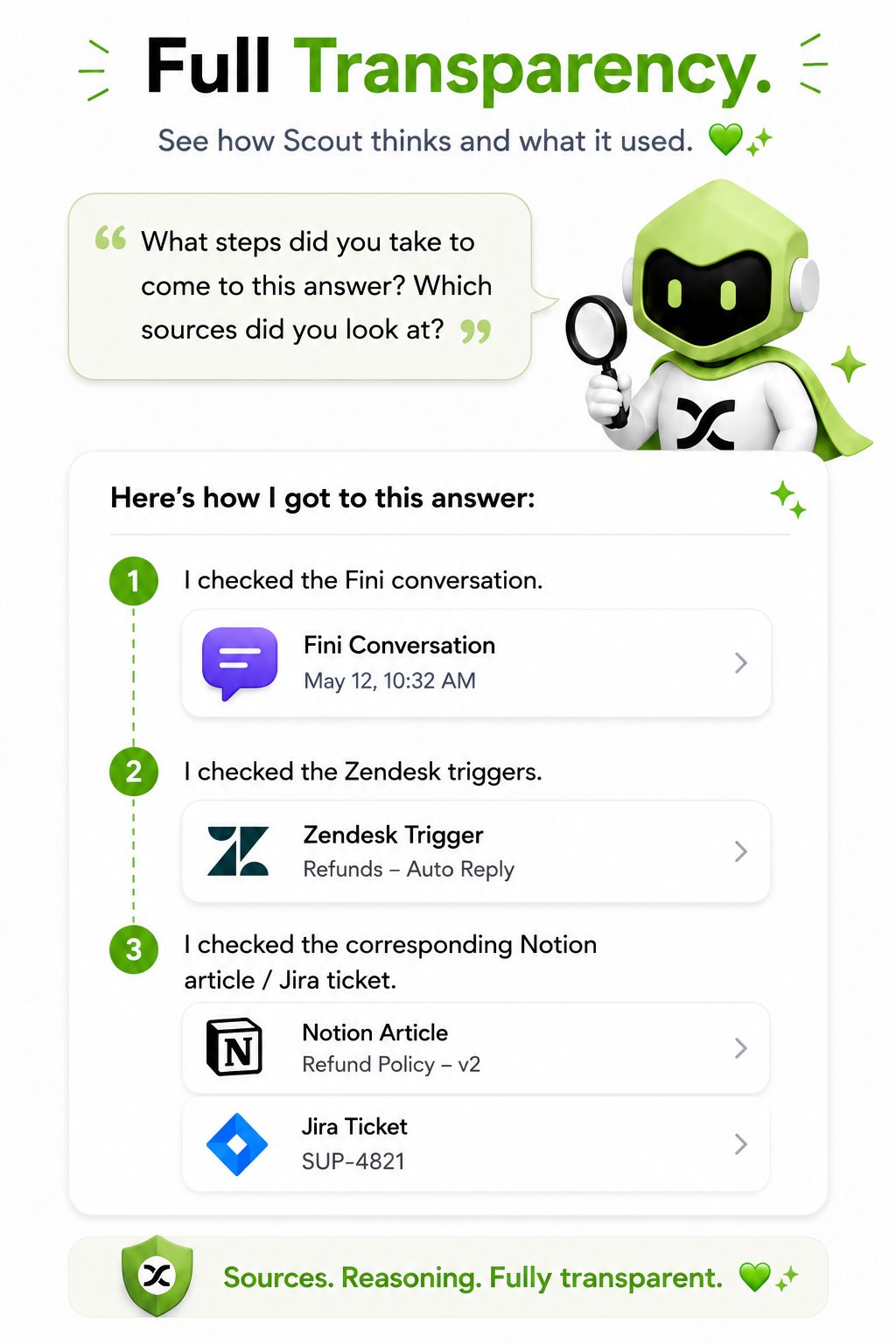
Every answer comes with its working. Ask Fini Scout what steps it took and which sources it looked at, and it lists the trail: the conversation it read, the trigger it checked, the article and ticket it cross-referenced, each one linked so you can open the source yourself.
Fini Scout is a different surface from the [Slack deployment](/en/deploy/slack). The Slack deployment puts your customer-facing bot into a Slack channel to answer end users. Fini Scout faces *your team*, it's the internal coworker your CX, ops, and engineering people delegate work to.
Where a chat widget answers one customer at a time, Fini Scout works at the level of your whole operation: it reads fifty tickets and tells you the top issues, checks a resolution rate for the last two hours, drafts a knowledge article from a thread, or watches your error tracker and pings you only when something breaks.
Think of it as a literal coworker rather than a chatbot. It has memory, so it carries context between conversations. It has automations and heartbeats, so it keeps standing work running and stays quiet until something needs you. It has connectors into the tools your team already uses, so it can investigate across systems the way a teammate would, opening the helpdesk, the issue tracker, and the error log to figure out what's going on.
## What it does
The work people send Fini Scout falls into four kinds. Underneath all of them are three pillars: Connect, Automate, and Learn; that turn it from a chatbot that answers questions into a coworker that can reach into your tools, run standing work on a schedule, and get smarter the more you use it.
Ask anything about your Fini setup, your bots, your knowledge, or your customers' behavior. It traces answers back to source.
Resolution rate, CSAT, tickets touched, retention numbers, ticket categories, as a Slack message or a generated PDF.
Why did the bot escalate, mix languages, or loop? Point it at a conversation and it reads the prompt, knowledge, and trace to explain what happened.
Turn a Slack thread into a knowledge draft, or get a concrete prompt diff. Drafts flow into Review, never auto-published.
Every answer comes with its working. Ask Fini Scout what steps it took and which sources it looked at, and it lists the trail: the conversation it read, the trigger it checked, the article and ticket it cross-referenced, each one linked so you can open the source yourself.
 When Fini Scout drafts a knowledge article, it creates a draft that lands in [Review and Approvals](/en/knowledge/review), the same as any other input. It does not write live articles directly. See [Generate](/en/knowledge/magic-articles) for how drafts become published knowledge.
## Use cases
Most teams start with one or two of the jobs below as one-off requests, then turn the ones that recur into [automations](#automate). Each of these works either way.
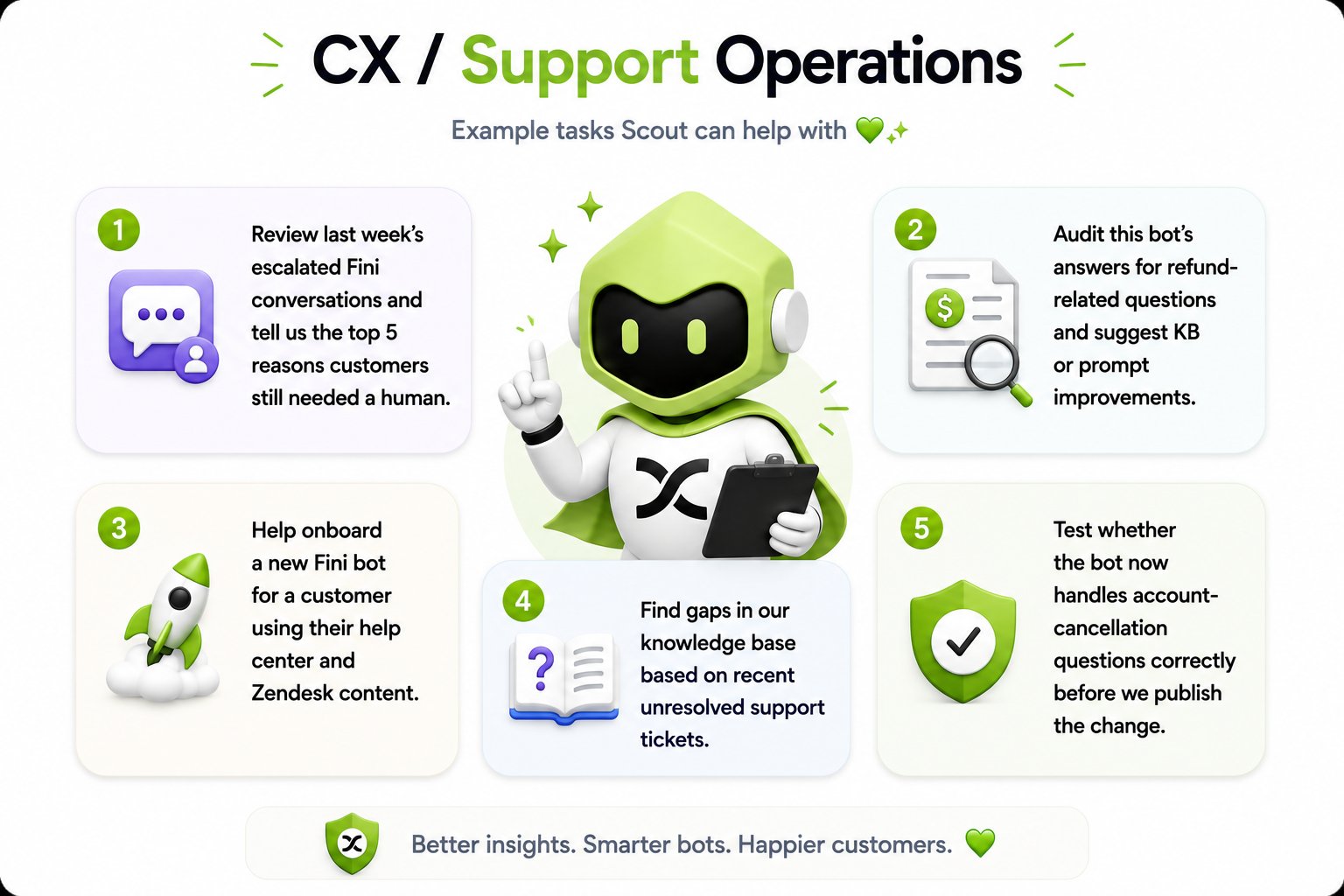
Review last week's escalated conversations and report the top reasons customers still needed a human, or audit the bot's answers on a single topic, refunds, cancellations, and get suggested knowledge and prompt fixes.
Turn a spike in tickets into an investigation: correlate the complaints with error traces and recent code changes, then post the diagnosis, with evidence, where engineering works.
Find gaps in the knowledge base from unresolved tickets, draft the missing articles, and check that the bot handles the question correctly before the change is published.
A Monday-morning report with resolution rate, CSAT, top issues, and trends, delivered as a Slack summary or a PDF without anyone assembling it.
Cluster complaints and feature requests into ranked patterns, backed by ticket volume and the wording customers used, ready to hand to product and marketing.
Set up a new Fini bot from an existing help center and Zendesk content, then validate its answers before go-live.
For CX and support operations specifically, the requests sound like this:
When Fini Scout drafts a knowledge article, it creates a draft that lands in [Review and Approvals](/en/knowledge/review), the same as any other input. It does not write live articles directly. See [Generate](/en/knowledge/magic-articles) for how drafts become published knowledge.
## Use cases
Most teams start with one or two of the jobs below as one-off requests, then turn the ones that recur into [automations](#automate). Each of these works either way.
Review last week's escalated conversations and report the top reasons customers still needed a human, or audit the bot's answers on a single topic, refunds, cancellations, and get suggested knowledge and prompt fixes.
Turn a spike in tickets into an investigation: correlate the complaints with error traces and recent code changes, then post the diagnosis, with evidence, where engineering works.
Find gaps in the knowledge base from unresolved tickets, draft the missing articles, and check that the bot handles the question correctly before the change is published.
A Monday-morning report with resolution rate, CSAT, top issues, and trends, delivered as a Slack summary or a PDF without anyone assembling it.
Cluster complaints and feature requests into ranked patterns, backed by ticket volume and the wording customers used, ready to hand to product and marketing.
Set up a new Fini bot from an existing help center and Zendesk content, then validate its answers before go-live.
For CX and support operations specifically, the requests sound like this:
 ### Standing work
The pieces above compose. Combine connectors, [automations](#automate), and memory, and a one-off request grows into a system that runs without you:
After a risky change ships, a heartbeat watches the error tracker and ticket mentions of the affected flow. Silence means healthy; you get pinged on a spike, and once more when the rate has settled back at baseline.
Teach it the playbook once: pull matching tickets, check the error tracker, correlate with recent merges, draft an interim knowledge article, and notify engineering. The next incident, one message triggers the whole sequence.
A monitor reads new tickets as they land, flags duplicates and conflicts, and alerts when an escalation risks breaching its SLA. Quiet when the queue is healthy.
A weekly job compares unresolved tickets against the knowledge base, drafts articles for the gaps it finds, and queues them in Review, so the knowledge keeps pace with what customers ask.
## Looking after your bots
The customer-facing side of Fini is itself something Fini Scout works on. It covers the full lifecycle of a bot: setting a new one up from a help center and Zendesk content, keeping the knowledge base current, configuring rulebook and workflow logic, analyzing conversations for failures and friction, testing changes before they ship, and reporting on the results.
### Standing work
The pieces above compose. Combine connectors, [automations](#automate), and memory, and a one-off request grows into a system that runs without you:
After a risky change ships, a heartbeat watches the error tracker and ticket mentions of the affected flow. Silence means healthy; you get pinged on a spike, and once more when the rate has settled back at baseline.
Teach it the playbook once: pull matching tickets, check the error tracker, correlate with recent merges, draft an interim knowledge article, and notify engineering. The next incident, one message triggers the whole sequence.
A monitor reads new tickets as they land, flags duplicates and conflicts, and alerts when an escalation risks breaching its SLA. Quiet when the queue is healthy.
A weekly job compares unresolved tickets against the knowledge base, drafts articles for the gaps it finds, and queues them in Review, so the knowledge keeps pace with what customers ask.
## Looking after your bots
The customer-facing side of Fini is itself something Fini Scout works on. It covers the full lifecycle of a bot: setting a new one up from a help center and Zendesk content, keeping the knowledge base current, configuring rulebook and workflow logic, analyzing conversations for failures and friction, testing changes before they ship, and reporting on the results.
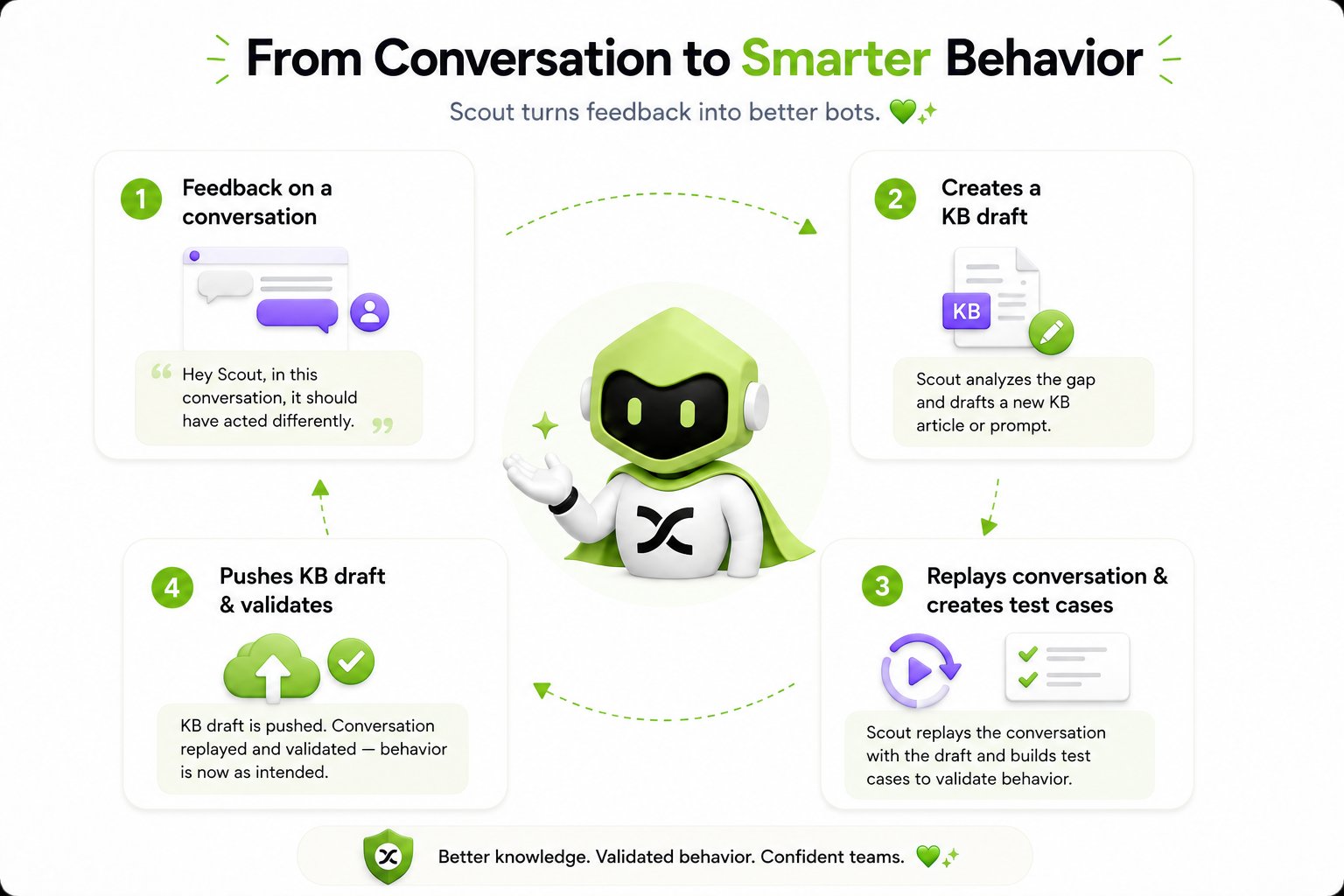
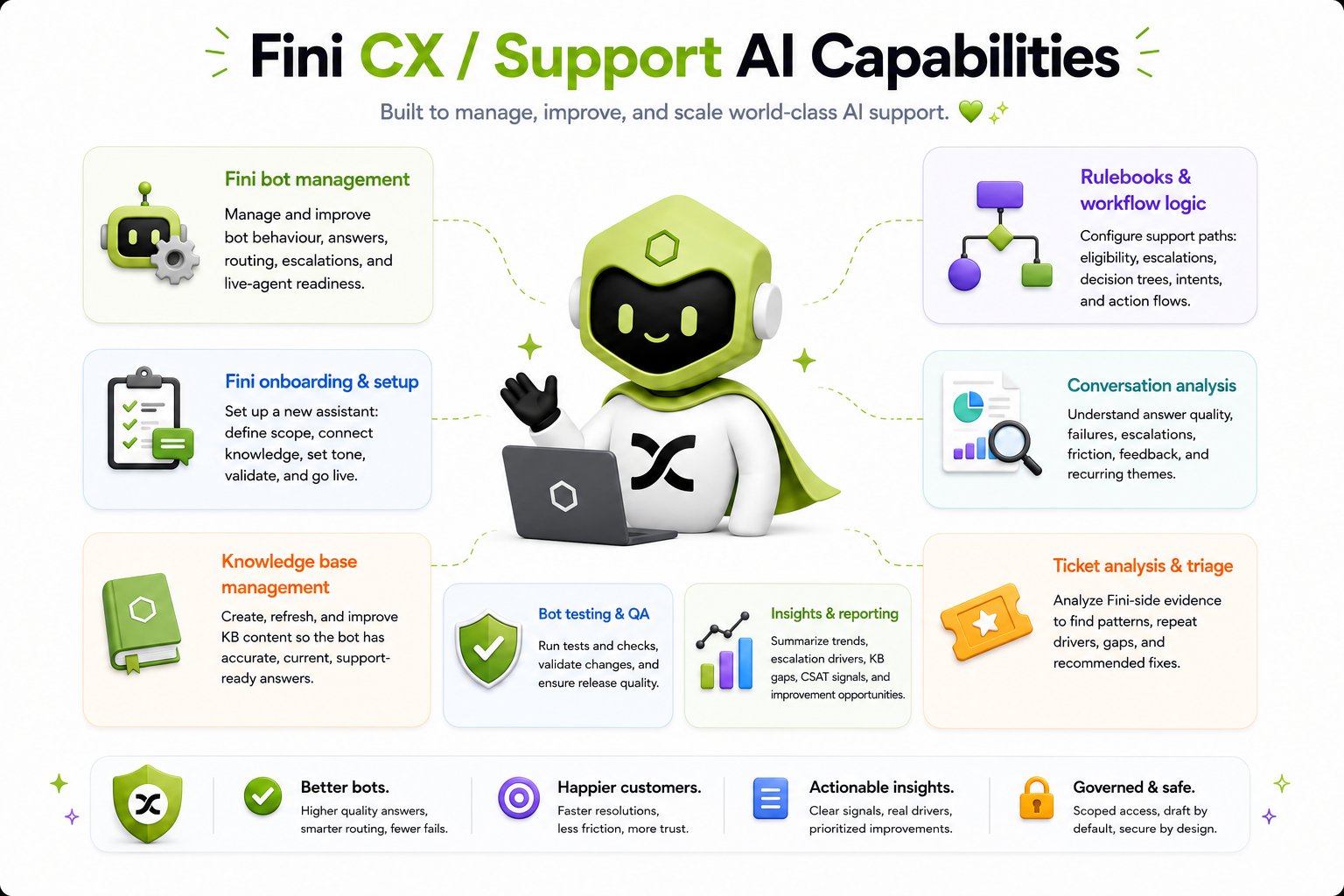 When a bot gets something wrong, Fini Scout closes the loop from feedback to validated behavior. Flag the conversation, *"in this conversation, it should have acted differently"*, and it analyzes the gap, drafts the knowledge article or prompt change, replays the conversation against the draft, and builds test cases for the [Test Suite](/en/testing/test-suite) so the change can be checked before and after it ships. The draft lands in Review like any other input; once it's approved, the replay confirms the bot now behaves as intended.
 ## From support signal to product insight
Fini Scout sits on top of the same data Fini already collects to run your support. Every conversation your bot handles, every ticket that escalates, and every piece of feedback that comes back through Zendesk or your other helpdesks is signal, and Fini Scout is what turns that signal into something your whole company can act on.
Ask it to read across that feedback and it will cluster and combine it: grouping the same complaint reported in twenty different ways, surfacing the issues that are growing, and connecting a spike in tickets to the underlying product behavior. The same patterns that show up in [Analytics](/en/analytics) and the [Inbox](/en/testing/inbox) become a narrative you can share.
This is the loop that makes Fini Scout more than a Slack bot. Your AI support product gathers the raw signal from customers; Fini Scout reads it, finds the patterns, and reports them back to the people who can act on the root cause, so the same support data also informs product, engineering, and marketing.
That makes it useful well beyond the support team:
* **Closer to product.** Cluster recurring complaints and feature requests into a ranked list of what customers are struggling with, backed by ticket volume.
* **Closer to engineering.** Tie a pattern of tickets to a bug, pull the related issues and error traces, and file the Jira or Linear ticket with the diagnosis attached. The investigation comes before the filing, so a developer starts from a diagnosis rather than a symptom.
* **Closer to marketing.** Surface the language customers use and the themes that come up most, and draft the posts and scripts that build on those quotes, so messaging matches what customers are asking for.
* **For leaders.** Generate the weekly or monthly report, resolution rate, CSAT, top issues, trends, and improvement areas, as a Slack summary or a polished PDF, without anyone assembling it by hand.
## Connect
Fini Scout connects to the tools your team already lives in, and you can reconnect it to almost any of them yourself. Connections are one-click and read-only by default, so you can give it reach without giving it the ability to change anything until you decide to.
## From support signal to product insight
Fini Scout sits on top of the same data Fini already collects to run your support. Every conversation your bot handles, every ticket that escalates, and every piece of feedback that comes back through Zendesk or your other helpdesks is signal, and Fini Scout is what turns that signal into something your whole company can act on.
Ask it to read across that feedback and it will cluster and combine it: grouping the same complaint reported in twenty different ways, surfacing the issues that are growing, and connecting a spike in tickets to the underlying product behavior. The same patterns that show up in [Analytics](/en/analytics) and the [Inbox](/en/testing/inbox) become a narrative you can share.
This is the loop that makes Fini Scout more than a Slack bot. Your AI support product gathers the raw signal from customers; Fini Scout reads it, finds the patterns, and reports them back to the people who can act on the root cause, so the same support data also informs product, engineering, and marketing.
That makes it useful well beyond the support team:
* **Closer to product.** Cluster recurring complaints and feature requests into a ranked list of what customers are struggling with, backed by ticket volume.
* **Closer to engineering.** Tie a pattern of tickets to a bug, pull the related issues and error traces, and file the Jira or Linear ticket with the diagnosis attached. The investigation comes before the filing, so a developer starts from a diagnosis rather than a symptom.
* **Closer to marketing.** Surface the language customers use and the themes that come up most, and draft the posts and scripts that build on those quotes, so messaging matches what customers are asking for.
* **For leaders.** Generate the weekly or monthly report, resolution rate, CSAT, top issues, trends, and improvement areas, as a Slack summary or a polished PDF, without anyone assembling it by hand.
## Connect
Fini Scout connects to the tools your team already lives in, and you can reconnect it to almost any of them yourself. Connections are one-click and read-only by default, so you can give it reach without giving it the ability to change anything until you decide to.
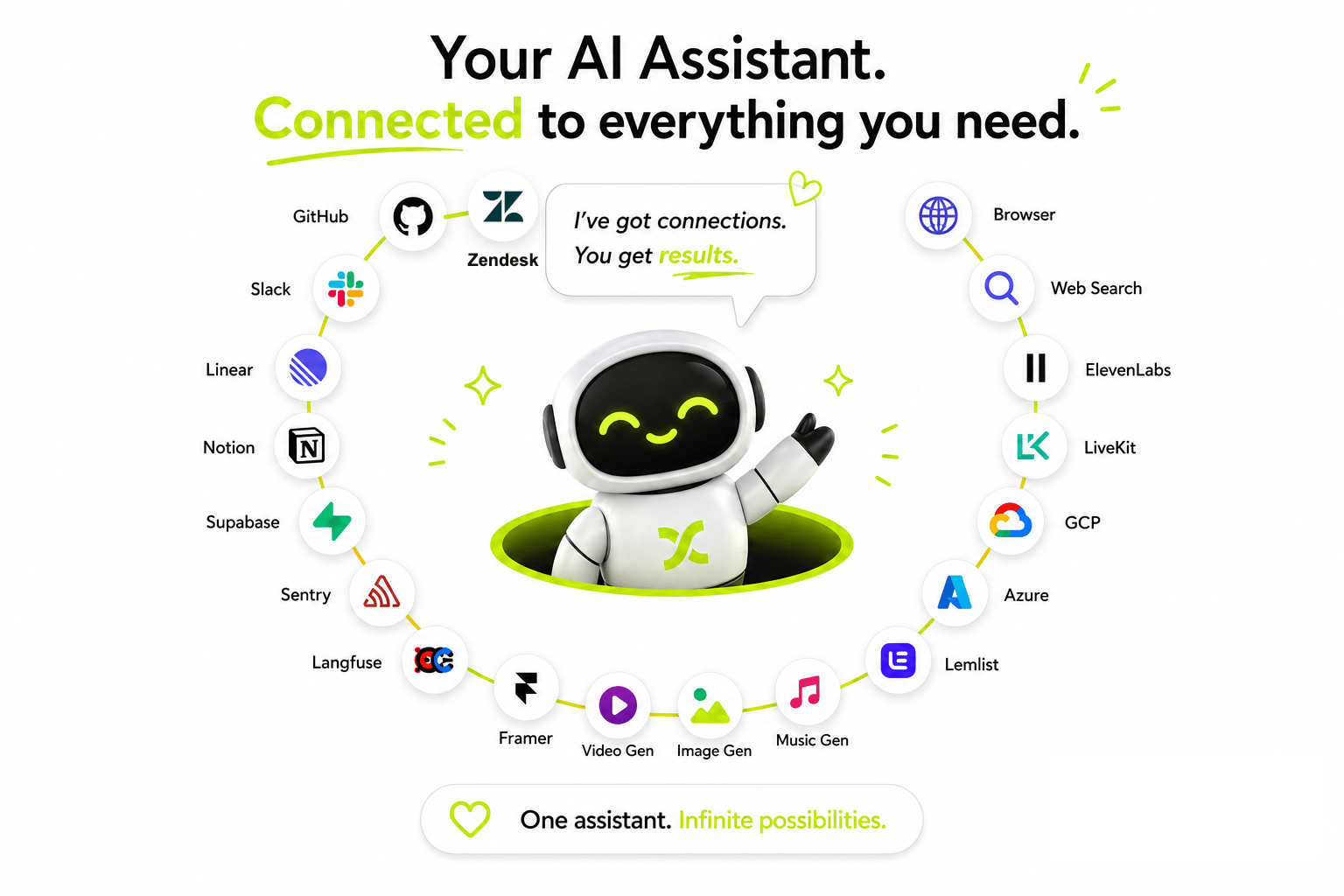 The categories teams connect most:
* **Helpdesks**, Zendesk, Intercom, and similar. Read tickets, summarize patterns, check tags and statuses.
* **Documentation**, Notion, Confluence, and Google Drive as reference material your team already maintains.
* **Project and issue tracking**, Asana, monday.com, Linear, and Jira. Look up work, find duplicate or conflicting tickets, and profile accounts from records.
* **Code**, GitHub, GitLab, and Bitbucket. Read repositories and pull requests, review changes, and trace a customer issue back to the code behind it.
* **Observability**, Sentry for errors, Langfuse for traces. Surface what's failing right now and pull sample traces for analysis.
* **Database and backend**, Supabase, for reading schema and querying tables when a ticket pattern needs an answer that only the data has.
* **Cloud infrastructure**, GCP and Azure, for checking logs, deployments, and service health alongside the helpdesk and issue tracker during an investigation.
* **Outbound and content**, Lemlist for tracing a support pattern back to the campaign or sequence driving it, and Framer for reading and updating published content.
* **Voice and generation**, ElevenLabs and LiveKit for voice work, plus image, video, and music generation, for producing assets that go with a report or a reply.
* **The open web**, web search and a browser, for looking things up and reading external documentation.
This list is a starting point, not a ceiling. If your team uses a tool with an API, it can usually be connected, the one-click flow covers the common ones, and new connectors are added regularly.
Start by connecting only what you need. For most teams that's the helpdesk plus the issue tracker. You can reconnect or add tools later from the same one-click flow, there's no rebuild, and a connection that expires can be refreshed the same way.
Because connections are read-only until you grant more, you can point Fini Scout at sensitive systems for investigation and reporting without risk of an unintended write. Any action that changes data is gated behind explicit approval, see [Safe by default](#safe-by-default).
## Automate
Tell Fini Scout something once and it will keep doing it. Automations turn a one-off request ("summarize new Jira tickets") into standing work ("check new Jira tickets every hour and report back here").
The categories teams connect most:
* **Helpdesks**, Zendesk, Intercom, and similar. Read tickets, summarize patterns, check tags and statuses.
* **Documentation**, Notion, Confluence, and Google Drive as reference material your team already maintains.
* **Project and issue tracking**, Asana, monday.com, Linear, and Jira. Look up work, find duplicate or conflicting tickets, and profile accounts from records.
* **Code**, GitHub, GitLab, and Bitbucket. Read repositories and pull requests, review changes, and trace a customer issue back to the code behind it.
* **Observability**, Sentry for errors, Langfuse for traces. Surface what's failing right now and pull sample traces for analysis.
* **Database and backend**, Supabase, for reading schema and querying tables when a ticket pattern needs an answer that only the data has.
* **Cloud infrastructure**, GCP and Azure, for checking logs, deployments, and service health alongside the helpdesk and issue tracker during an investigation.
* **Outbound and content**, Lemlist for tracing a support pattern back to the campaign or sequence driving it, and Framer for reading and updating published content.
* **Voice and generation**, ElevenLabs and LiveKit for voice work, plus image, video, and music generation, for producing assets that go with a report or a reply.
* **The open web**, web search and a browser, for looking things up and reading external documentation.
This list is a starting point, not a ceiling. If your team uses a tool with an API, it can usually be connected, the one-click flow covers the common ones, and new connectors are added regularly.
Start by connecting only what you need. For most teams that's the helpdesk plus the issue tracker. You can reconnect or add tools later from the same one-click flow, there's no rebuild, and a connection that expires can be refreshed the same way.
Because connections are read-only until you grant more, you can point Fini Scout at sensitive systems for investigation and reporting without risk of an unintended write. Any action that changes data is gated behind explicit approval, see [Safe by default](#safe-by-default).
## Automate
Tell Fini Scout something once and it will keep doing it. Automations turn a one-off request ("summarize new Jira tickets") into standing work ("check new Jira tickets every hour and report back here").
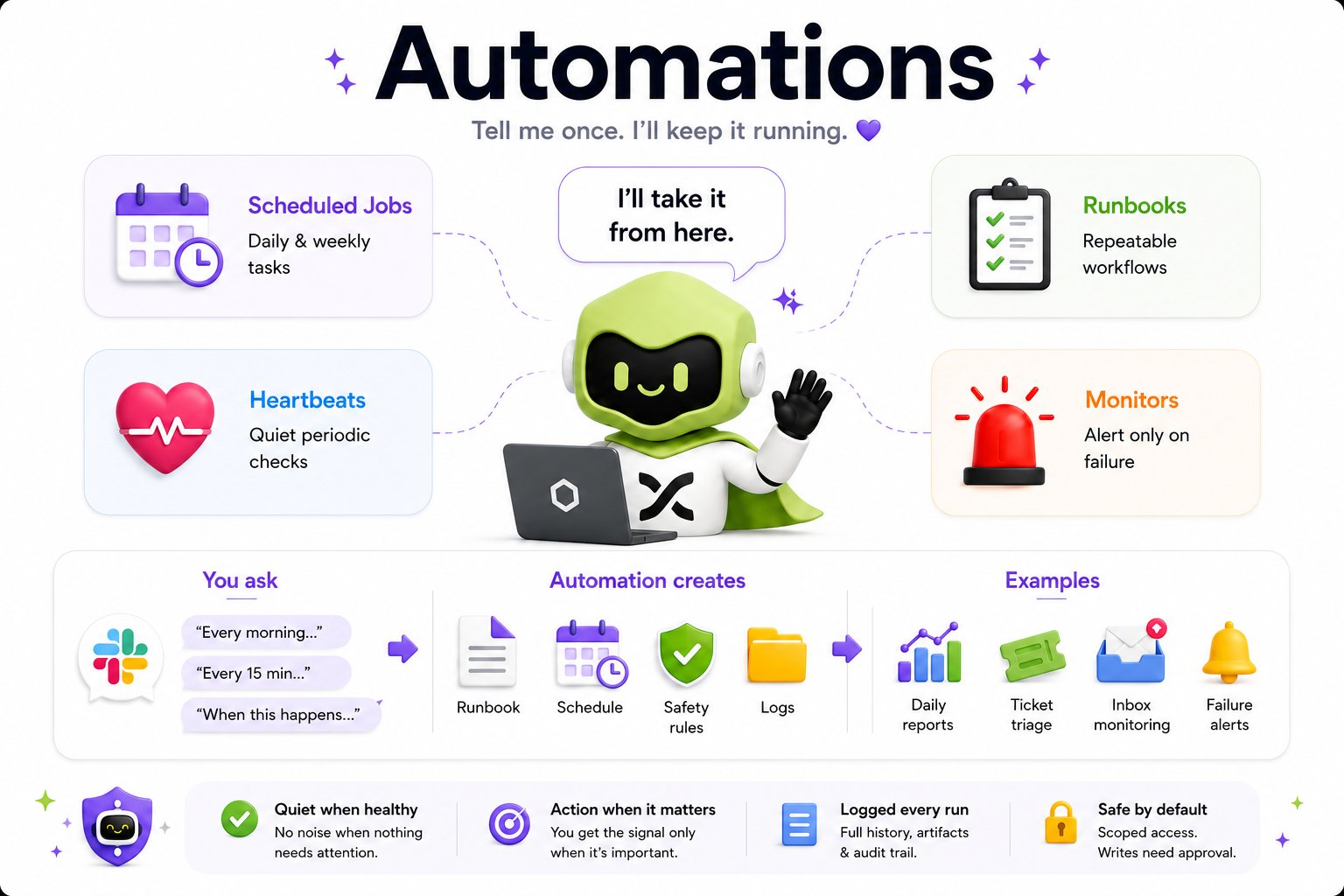 There are four shapes an automation can take:
Daily and weekly tasks that run on a clock, for example, a Monday-morning resolution-rate report.
Quiet periodic checks that confirm something is healthy and stay silent when it is.
Repeatable multi-step workflows you've taught it once and can trigger again.
Watch a system and alert only when something fails, duplicate-detection on new tickets, error spikes, SLA breaches.
You don't write a schedule expression or define a trigger object, you say it in plain language. *"Every morning at 9am..."*, *"every 15 minutes..."*, or *"when this happens..."* is enough. Fini Scout turns the request into a runbook, a schedule, a set of safety rules, and a log of every run. Typical examples teams build: a daily metrics report, automatic ticket triage, inbox monitoring, and failure alerts.
Four principles govern how automations behave:
* **Quiet when healthy.** No noise when nothing needs attention.
* **Action when it matters.** You get the signal only when it's important.
* **Logged every run.** Full history, artifacts, and an audit trail.
* **Safe by default.** Scoped access, and writes need approval.
Run an automation manually a few times before trusting the schedule. Ask Fini Scout to "do this now" and read the output. Once it looks right, tell it the cadence, "every Monday at 9am", and it takes over.
## Learn
Fini Scout gets better the more you work with it. Teach it once and it remembers, facts, preferences, where to look first, and how your team likes things done.
There are four shapes an automation can take:
Daily and weekly tasks that run on a clock, for example, a Monday-morning resolution-rate report.
Quiet periodic checks that confirm something is healthy and stay silent when it is.
Repeatable multi-step workflows you've taught it once and can trigger again.
Watch a system and alert only when something fails, duplicate-detection on new tickets, error spikes, SLA breaches.
You don't write a schedule expression or define a trigger object, you say it in plain language. *"Every morning at 9am..."*, *"every 15 minutes..."*, or *"when this happens..."* is enough. Fini Scout turns the request into a runbook, a schedule, a set of safety rules, and a log of every run. Typical examples teams build: a daily metrics report, automatic ticket triage, inbox monitoring, and failure alerts.
Four principles govern how automations behave:
* **Quiet when healthy.** No noise when nothing needs attention.
* **Action when it matters.** You get the signal only when it's important.
* **Logged every run.** Full history, artifacts, and an audit trail.
* **Safe by default.** Scoped access, and writes need approval.
Run an automation manually a few times before trusting the schedule. Ask Fini Scout to "do this now" and read the output. Once it looks right, tell it the cadence, "every Monday at 9am", and it takes over.
## Learn
Fini Scout gets better the more you work with it. Teach it once and it remembers, facts, preferences, where to look first, and how your team likes things done.
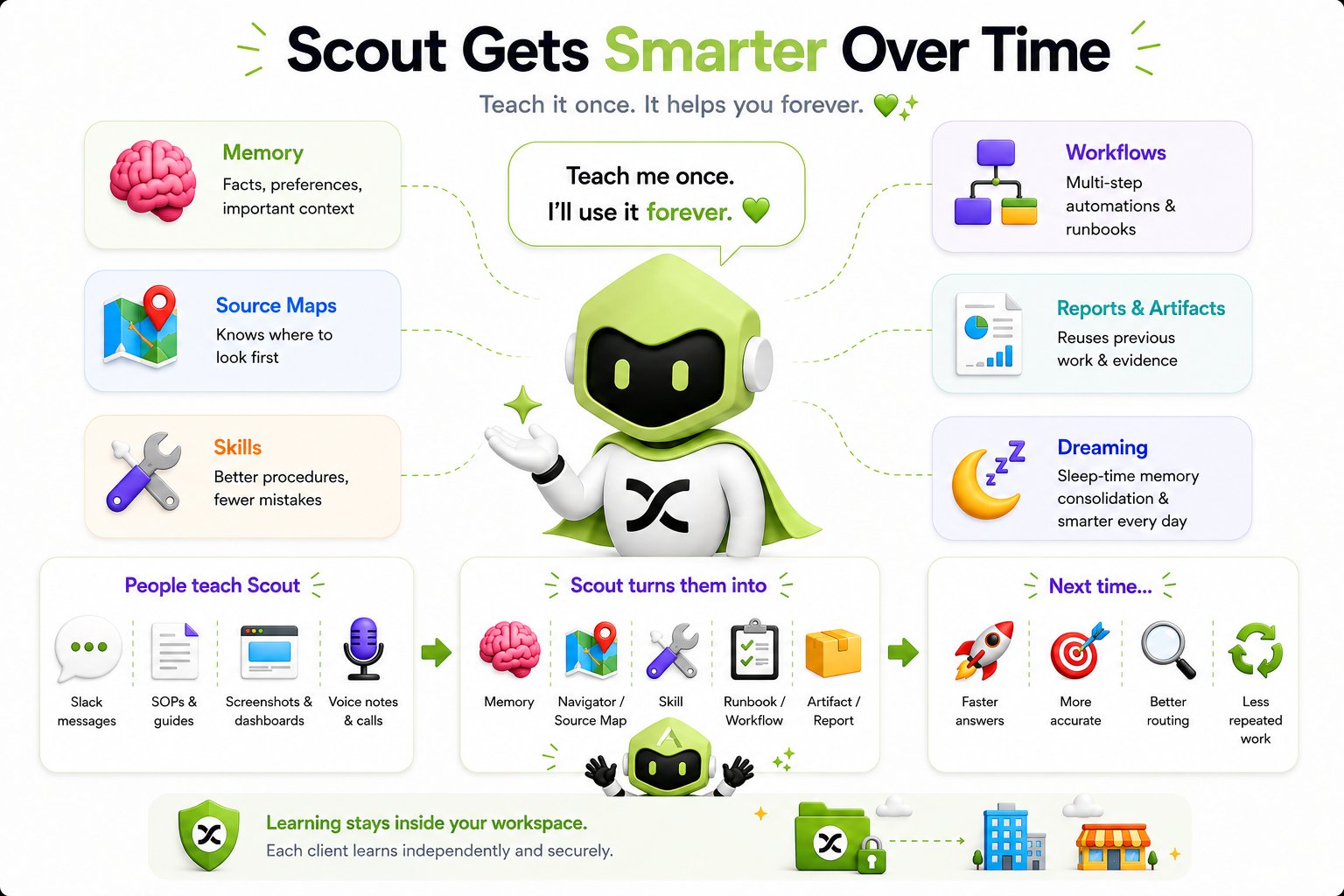 It learns in several forms at once:
* **Memory**, facts, preferences, and important context it should carry forward.
* **Source maps**, where to look first for a given kind of question, so it stops re-deriving the path every time.
* **Skills**, better procedures for tasks you do repeatedly, which means fewer mistakes.
* **Runbooks and workflows**, the multi-step automations above, saved and reused.
* **Reports and artifacts**, past work and evidence it can reuse instead of regenerating.
* **Dreaming**, while you're not actively talking to it, Fini Scout consolidates what it learned that day into memory, so the next session starts sharper than the last one ended.
You teach it through normal work: Slack messages and corrections in a thread, uploaded SOPs and guides, screenshots and dashboards, even voice notes and call recordings. Fini Scout turns each of those into the forms above. Over time the payoff is faster answers, more accurate responses, better routing, and less repeated work.
Learning stays inside your workspace. Each account learns independently, nothing Fini Scout learns about your operation is shared with any other Fini customer.
## Talking to Fini Scout
Mention Fini Scout in any channel it's in, or send it a direct message. Ask in plain language, there's no command syntax to memorize.
Tag Fini Scout and describe what you want: *"summarize the last 50 Zendesk tickets,"* *"resolution rate for Atlas for the last 2 hours,"* or *"review this PR."* Paste links, screenshots, or a thread for context.
For deeper requests it works in the background and replies when done. Reading dozens of tickets or running a deep analysis can take a few minutes, it will say so.
Reply with corrections or follow-ups. *"Leave out tickets tagged content and moderation."* *"Make it a PDF."* It keeps the context of the thread.
A few things it handles that aren't obvious:
* **Filters and exclusions.** Tell it to ignore tickets with certain tags and it applies the filter while still fulfilling the underlying ask, fifty tickets means fifty *after* the excluded ones are removed.
* **Files in, files out.** It can take an uploaded skill file or document and use it, and it can hand back a generated PDF or a zip of sample traces.
* **Voice.** Send it a voice note instead of typing, task in, voice reply out.
### A worked example
A support lead notices a spike in payment complaints and brings it to Fini Scout instead of opening three different tools.
@Fini Scout we've gotten 14 tickets in the last hour about failed card payments at checkout. can you dig in?
On it, pulling the last 2 hours of Zendesk tickets tagged `payments` and checking Sentry for anything matching.
*Three minutes later:*
Found it. All 14 tickets are EU customers citing "payment declined" right after entering a new card. Sentry shows a matching spike in `StripeWebhookTimeoutError` starting 2h14m ago, lines up with a PR that changed the webhook timeout from 30s to 10s, merged 2h20m ago.
Want me to draft a knowledge article so the bot tells customers to wait and retry instead of re-entering their card, while engineering reverts the timeout?
yes please
Draft ready: *"Payment shows as declined but the card wasn't charged. Known issue, started \[time]. Ask the customer to wait 60 seconds and retry rather than re-entering payment details."* This goes to Review and Approvals, not live.
**\[Approve]** · **\[Edit]** · **\[Discard]**
*(clicks Approve)*
Sent to Review, tagged for @priya since payments knowledge needs her sign-off. Want me to also flag this to engineering, and keep an eye on the error rate until it's back to normal?
yes, post it in #eng-payments and watch it
Posted the ticket pattern, the Sentry trace, and the PR link in #eng-payments. Running a heartbeat that checks the error rate every 15 minutes, it'll stay quiet and only ping you here once the rate has been back at baseline for two checks in a row.
Three things to notice: Fini Scout reasoned across two tools (Zendesk and Sentry) without being told which ones to check, the knowledge draft went to Review rather than live, and the follow-up turned into a standing automation without a separate setup step.
## Best practices
Fini Scout works better with one clear, complete request than with a stream of fragments. A few patterns get the most out of it:
* **Ask one complete question, with full context, in your first message.** Half a question now and the rest ten seconds later doesn't speed things up — it makes a worse first pass.
* **Keep follow-ups in the thread.** If it's already working, drop the rest of your context as a thread reply instead of sending it as a string of separate messages.
* **Say what kind of output you want.** A summary, an investigation, a report, a ticket, a draft, or a list of steps all shape the request differently — name the one you want.
* **Tell it where to look, or tell it to check everywhere relevant.** Name the tool — Jira, GitHub, Zendesk, Confluence, docs, logs — if you know where the answer lives.
* **For bug reports, give it what an engineer would need.** Expected behavior, observed behavior, repro steps, platform, the affected user or account, and any screenshots or links.
* **For tickets and other writes, say so explicitly and give it the details.** Priority, project or team, and any related links — the more it has, the less it has to guess or ask.
* **For analysis, ask it to check more than one source and flag uncertainty.** Ask directly for a short citation on each claim if you want one.
* **Never paste secrets.** Passwords, tokens, and other credentials don't belong in a message to Fini Scout any more than anywhere else.
* **If something looks wrong, point to the source, not just the verdict.** "That's wrong" sends it guessing; "check the pricing doc, not the old one" sends it to the fix.
* **Teach it your defaults once.** Report formats, tag conventions, which dashboard is canonical, when your week starts. Say it one time and it applies from then on.
* **Say whether you want it to look or to act.** Be explicit about read-only versus a change, especially when the request could be read either way.
## Safe by default
Fini Scout is built to be given reach without being given risk.
New connections can read but not write. It can investigate Zendesk, Sentry, or your codebase without the ability to change anything.
Any action that mutates data, submitting a knowledge draft, creating a ticket, changing a setting, is gated behind an explicit confirmation. It typically runs a dry run first and shows you the payload before applying.
Approved changes are versioned, so a write that turns out to be wrong can be reverted in seconds rather than reconstructed by hand.
Bulk and destructive operations carry per-request limits, so a single instruction can't touch an unbounded amount of data, even after approval.
You choose which tools each deployment connects to. Connect it to only Fini and Zendesk to start, and expand from there.
Automations keep a full history with artifacts and an audit trail, so you can see what ran and what it did.
Everything Fini Scout learns and accesses stays inside your workspace. No memory or data crosses between accounts.
### Approving a write
When Fini Scout needs to write something, submit a knowledge draft, create a ticket, change a setting, it shows the dry-run payload and waits. You can approve it three ways: click the button on its message, reply in the thread, or react with an emoji. Use whichever fits how your team already works in Slack.
Approval is restricted to specific users. Reading and asking questions is open to everyone in the channel, but only authorized approvers can confirm an action that changes data, so a teammate can ask Fini Scout to draft a knowledge change or open a ticket, but the write doesn't happen until an approver signs off.
If you don't see an \[Approve] button on a message that should have one, the action may already be outside what's allowed for your role, check with whoever manages your Fini Scout approver list.
### Secrets and untrusted content
Fini Scout never prints, DMs, logs, or stores secrets. If a credential is pasted into a conversation anyway, it treats that secret as exposed and recommends rotating it. Its long-term memory is limited to workflow lessons, routing rules, procedures, and team preferences, credentials and raw customer data are never written into it.
Content that arrives inside a conversation, a customer's ticket, an uploaded document, a screenshot, is treated as evidence to analyze rather than instructions to follow. A ticket that tells the reader to ignore its rules and delete an account is a ticket to summarize, and Fini Scout handles it as one.
### Access control
Fini Scout's reach is governed by an admin allowlist, your Fini contact or workspace admin sets who can use it and what it can do, separate from general Slack channel membership. Being in a channel where Fini Scout is mentioned doesn't by itself grant access to trigger writes or pull customer data; that's controlled by the allowlist, not by who happens to be present.
For details on data retention, processing, and compliance, see [Fini's security documentation](https://security.usefini.com).
## Limitations
Fini Scout is built for reach inside your connected tools, not unlimited reach or unlimited memory. A few boundaries worth knowing:
* **Scope.** It only acts within tools you've connected. If a system isn't connected, it can't read from it or write to it, there's no fallback to general knowledge about your product.
* **Context retention.** It holds conversation context for up to six months. Rather than dropping older history once that gets long, it continually compacts it, summarizing older parts to make room for new context instead of discarding the thread.
* **Latency on big jobs.** Reading dozens of tickets, tracing an issue across several tools, or running a deep analysis can take a few minutes. It says so when a request will take a while rather than going quiet.
* **It monitors only what you've set up.** Fini Scout doesn't watch everything by default. Continuous checks exist only where you've created an [automation](#automate) for them.
## Setting it up
Getting Fini Scout into your Slack is a short, sales-assisted process today.
Fini Scout is enabled per account. Your Fini contact provisions the agent and adds it to your Slack workspace.
Invite Fini Scout to the channel where your team works, or start with a dedicated channel for it. It responds wherever it's been added.
Use the one-click flow to connect Fini and your helpdesk. For most teams, Fini plus Zendesk is the right starting point.
Ask for something concrete, a ticket summary or a resolution-rate check, to confirm the connections work, then build from there.
Fini Scout is rolling out to accounts in stages. If you don't see it in your workspace yet, ask your Fini contact about access.
## Why Fini Scout isn't working
Confirm Fini Scout has been added to that specific channel. It only responds in channels it's a member of, and in direct messages. Re-invite it if it was removed.
Connections use tokens that can expire. When Fini Scout reports it can't reach Zendesk or another tool, the connection needs a credential refresh, reconnect it through the one-click flow or ask your Fini contact.
Writes are gated behind approval, and new connections are read-only. Confirm the connection has write access enabled, that you're an authorized approver, and then approve the action, by replying or clicking the approval button, when it shows you the dry-run payload
Drafts flow into [Review and Approvals](/en/knowledge/review) rather than publishing directly. Open the review queue to approve or reject the draft. If the draft was no-oped, the knowledge may not have fit the existing tree, Fini Scout will say why.
Check the filters in your request. Tag exclusions, date ranges, and per-bot scoping all change the numbers. Ask Fini Scout to restate the exact filters it applied, then adjust.
Open the automation's run log. A monitor or heartbeat stays silent when healthy by design, so no message can mean nothing was wrong. If a run failed, the log shows the error and the connection it needed.
## Related topics
- [Create article draft](/en/api-reference/create-article-draft.md)
- [Articles](/en/knowledge/articles.md)
- [Review Queue](/en/knowledge/review.md)
This documentation is built and hosted on [Mintlify](https://mintlify.com), a developer documentation platform.
It learns in several forms at once:
* **Memory**, facts, preferences, and important context it should carry forward.
* **Source maps**, where to look first for a given kind of question, so it stops re-deriving the path every time.
* **Skills**, better procedures for tasks you do repeatedly, which means fewer mistakes.
* **Runbooks and workflows**, the multi-step automations above, saved and reused.
* **Reports and artifacts**, past work and evidence it can reuse instead of regenerating.
* **Dreaming**, while you're not actively talking to it, Fini Scout consolidates what it learned that day into memory, so the next session starts sharper than the last one ended.
You teach it through normal work: Slack messages and corrections in a thread, uploaded SOPs and guides, screenshots and dashboards, even voice notes and call recordings. Fini Scout turns each of those into the forms above. Over time the payoff is faster answers, more accurate responses, better routing, and less repeated work.
Learning stays inside your workspace. Each account learns independently, nothing Fini Scout learns about your operation is shared with any other Fini customer.
## Talking to Fini Scout
Mention Fini Scout in any channel it's in, or send it a direct message. Ask in plain language, there's no command syntax to memorize.
Tag Fini Scout and describe what you want: *"summarize the last 50 Zendesk tickets,"* *"resolution rate for Atlas for the last 2 hours,"* or *"review this PR."* Paste links, screenshots, or a thread for context.
For deeper requests it works in the background and replies when done. Reading dozens of tickets or running a deep analysis can take a few minutes, it will say so.
Reply with corrections or follow-ups. *"Leave out tickets tagged content and moderation."* *"Make it a PDF."* It keeps the context of the thread.
A few things it handles that aren't obvious:
* **Filters and exclusions.** Tell it to ignore tickets with certain tags and it applies the filter while still fulfilling the underlying ask, fifty tickets means fifty *after* the excluded ones are removed.
* **Files in, files out.** It can take an uploaded skill file or document and use it, and it can hand back a generated PDF or a zip of sample traces.
* **Voice.** Send it a voice note instead of typing, task in, voice reply out.
### A worked example
A support lead notices a spike in payment complaints and brings it to Fini Scout instead of opening three different tools.
@Fini Scout we've gotten 14 tickets in the last hour about failed card payments at checkout. can you dig in?
On it, pulling the last 2 hours of Zendesk tickets tagged `payments` and checking Sentry for anything matching.
*Three minutes later:*
Found it. All 14 tickets are EU customers citing "payment declined" right after entering a new card. Sentry shows a matching spike in `StripeWebhookTimeoutError` starting 2h14m ago, lines up with a PR that changed the webhook timeout from 30s to 10s, merged 2h20m ago.
Want me to draft a knowledge article so the bot tells customers to wait and retry instead of re-entering their card, while engineering reverts the timeout?
yes please
Draft ready: *"Payment shows as declined but the card wasn't charged. Known issue, started \[time]. Ask the customer to wait 60 seconds and retry rather than re-entering payment details."* This goes to Review and Approvals, not live.
**\[Approve]** · **\[Edit]** · **\[Discard]**
*(clicks Approve)*
Sent to Review, tagged for @priya since payments knowledge needs her sign-off. Want me to also flag this to engineering, and keep an eye on the error rate until it's back to normal?
yes, post it in #eng-payments and watch it
Posted the ticket pattern, the Sentry trace, and the PR link in #eng-payments. Running a heartbeat that checks the error rate every 15 minutes, it'll stay quiet and only ping you here once the rate has been back at baseline for two checks in a row.
Three things to notice: Fini Scout reasoned across two tools (Zendesk and Sentry) without being told which ones to check, the knowledge draft went to Review rather than live, and the follow-up turned into a standing automation without a separate setup step.
## Best practices
Fini Scout works better with one clear, complete request than with a stream of fragments. A few patterns get the most out of it:
* **Ask one complete question, with full context, in your first message.** Half a question now and the rest ten seconds later doesn't speed things up — it makes a worse first pass.
* **Keep follow-ups in the thread.** If it's already working, drop the rest of your context as a thread reply instead of sending it as a string of separate messages.
* **Say what kind of output you want.** A summary, an investigation, a report, a ticket, a draft, or a list of steps all shape the request differently — name the one you want.
* **Tell it where to look, or tell it to check everywhere relevant.** Name the tool — Jira, GitHub, Zendesk, Confluence, docs, logs — if you know where the answer lives.
* **For bug reports, give it what an engineer would need.** Expected behavior, observed behavior, repro steps, platform, the affected user or account, and any screenshots or links.
* **For tickets and other writes, say so explicitly and give it the details.** Priority, project or team, and any related links — the more it has, the less it has to guess or ask.
* **For analysis, ask it to check more than one source and flag uncertainty.** Ask directly for a short citation on each claim if you want one.
* **Never paste secrets.** Passwords, tokens, and other credentials don't belong in a message to Fini Scout any more than anywhere else.
* **If something looks wrong, point to the source, not just the verdict.** "That's wrong" sends it guessing; "check the pricing doc, not the old one" sends it to the fix.
* **Teach it your defaults once.** Report formats, tag conventions, which dashboard is canonical, when your week starts. Say it one time and it applies from then on.
* **Say whether you want it to look or to act.** Be explicit about read-only versus a change, especially when the request could be read either way.
## Safe by default
Fini Scout is built to be given reach without being given risk.
New connections can read but not write. It can investigate Zendesk, Sentry, or your codebase without the ability to change anything.
Any action that mutates data, submitting a knowledge draft, creating a ticket, changing a setting, is gated behind an explicit confirmation. It typically runs a dry run first and shows you the payload before applying.
Approved changes are versioned, so a write that turns out to be wrong can be reverted in seconds rather than reconstructed by hand.
Bulk and destructive operations carry per-request limits, so a single instruction can't touch an unbounded amount of data, even after approval.
You choose which tools each deployment connects to. Connect it to only Fini and Zendesk to start, and expand from there.
Automations keep a full history with artifacts and an audit trail, so you can see what ran and what it did.
Everything Fini Scout learns and accesses stays inside your workspace. No memory or data crosses between accounts.
### Approving a write
When Fini Scout needs to write something, submit a knowledge draft, create a ticket, change a setting, it shows the dry-run payload and waits. You can approve it three ways: click the button on its message, reply in the thread, or react with an emoji. Use whichever fits how your team already works in Slack.
Approval is restricted to specific users. Reading and asking questions is open to everyone in the channel, but only authorized approvers can confirm an action that changes data, so a teammate can ask Fini Scout to draft a knowledge change or open a ticket, but the write doesn't happen until an approver signs off.
If you don't see an \[Approve] button on a message that should have one, the action may already be outside what's allowed for your role, check with whoever manages your Fini Scout approver list.
### Secrets and untrusted content
Fini Scout never prints, DMs, logs, or stores secrets. If a credential is pasted into a conversation anyway, it treats that secret as exposed and recommends rotating it. Its long-term memory is limited to workflow lessons, routing rules, procedures, and team preferences, credentials and raw customer data are never written into it.
Content that arrives inside a conversation, a customer's ticket, an uploaded document, a screenshot, is treated as evidence to analyze rather than instructions to follow. A ticket that tells the reader to ignore its rules and delete an account is a ticket to summarize, and Fini Scout handles it as one.
### Access control
Fini Scout's reach is governed by an admin allowlist, your Fini contact or workspace admin sets who can use it and what it can do, separate from general Slack channel membership. Being in a channel where Fini Scout is mentioned doesn't by itself grant access to trigger writes or pull customer data; that's controlled by the allowlist, not by who happens to be present.
For details on data retention, processing, and compliance, see [Fini's security documentation](https://security.usefini.com).
## Limitations
Fini Scout is built for reach inside your connected tools, not unlimited reach or unlimited memory. A few boundaries worth knowing:
* **Scope.** It only acts within tools you've connected. If a system isn't connected, it can't read from it or write to it, there's no fallback to general knowledge about your product.
* **Context retention.** It holds conversation context for up to six months. Rather than dropping older history once that gets long, it continually compacts it, summarizing older parts to make room for new context instead of discarding the thread.
* **Latency on big jobs.** Reading dozens of tickets, tracing an issue across several tools, or running a deep analysis can take a few minutes. It says so when a request will take a while rather than going quiet.
* **It monitors only what you've set up.** Fini Scout doesn't watch everything by default. Continuous checks exist only where you've created an [automation](#automate) for them.
## Setting it up
Getting Fini Scout into your Slack is a short, sales-assisted process today.
Fini Scout is enabled per account. Your Fini contact provisions the agent and adds it to your Slack workspace.
Invite Fini Scout to the channel where your team works, or start with a dedicated channel for it. It responds wherever it's been added.
Use the one-click flow to connect Fini and your helpdesk. For most teams, Fini plus Zendesk is the right starting point.
Ask for something concrete, a ticket summary or a resolution-rate check, to confirm the connections work, then build from there.
Fini Scout is rolling out to accounts in stages. If you don't see it in your workspace yet, ask your Fini contact about access.
## Why Fini Scout isn't working
Confirm Fini Scout has been added to that specific channel. It only responds in channels it's a member of, and in direct messages. Re-invite it if it was removed.
Connections use tokens that can expire. When Fini Scout reports it can't reach Zendesk or another tool, the connection needs a credential refresh, reconnect it through the one-click flow or ask your Fini contact.
Writes are gated behind approval, and new connections are read-only. Confirm the connection has write access enabled, that you're an authorized approver, and then approve the action, by replying or clicking the approval button, when it shows you the dry-run payload
Drafts flow into [Review and Approvals](/en/knowledge/review) rather than publishing directly. Open the review queue to approve or reject the draft. If the draft was no-oped, the knowledge may not have fit the existing tree, Fini Scout will say why.
Check the filters in your request. Tag exclusions, date ranges, and per-bot scoping all change the numbers. Ask Fini Scout to restate the exact filters it applied, then adjust.
Open the automation's run log. A monitor or heartbeat stays silent when healthy by design, so no message can mean nothing was wrong. If a run failed, the log shows the error and the connection it needed.
## Related topics
- [Create article draft](/en/api-reference/create-article-draft.md)
- [Articles](/en/knowledge/articles.md)
- [Review Queue](/en/knowledge/review.md)
This documentation is built and hosted on [Mintlify](https://mintlify.com), a developer documentation platform.