> ## Documentation Index
> Fetch the complete documentation index at: https://docs.usefini.com/llms.txt
> Use this file to discover all available pages before exploring further.
# Refine with AI
> Use AI-assisted review to turn a bad agent reply into proposed prompt, knowledge, or rule changes.
Refine with AI helps your team debug and improve one Fini reply from Inbox. Pick a reply, describe what went wrong, and Fini analyzes the trace behind that answer. It can draft changes to prompts, knowledge articles, or rules, replay the conversation with those drafts, and show the before-and-after answer before anything is applied.
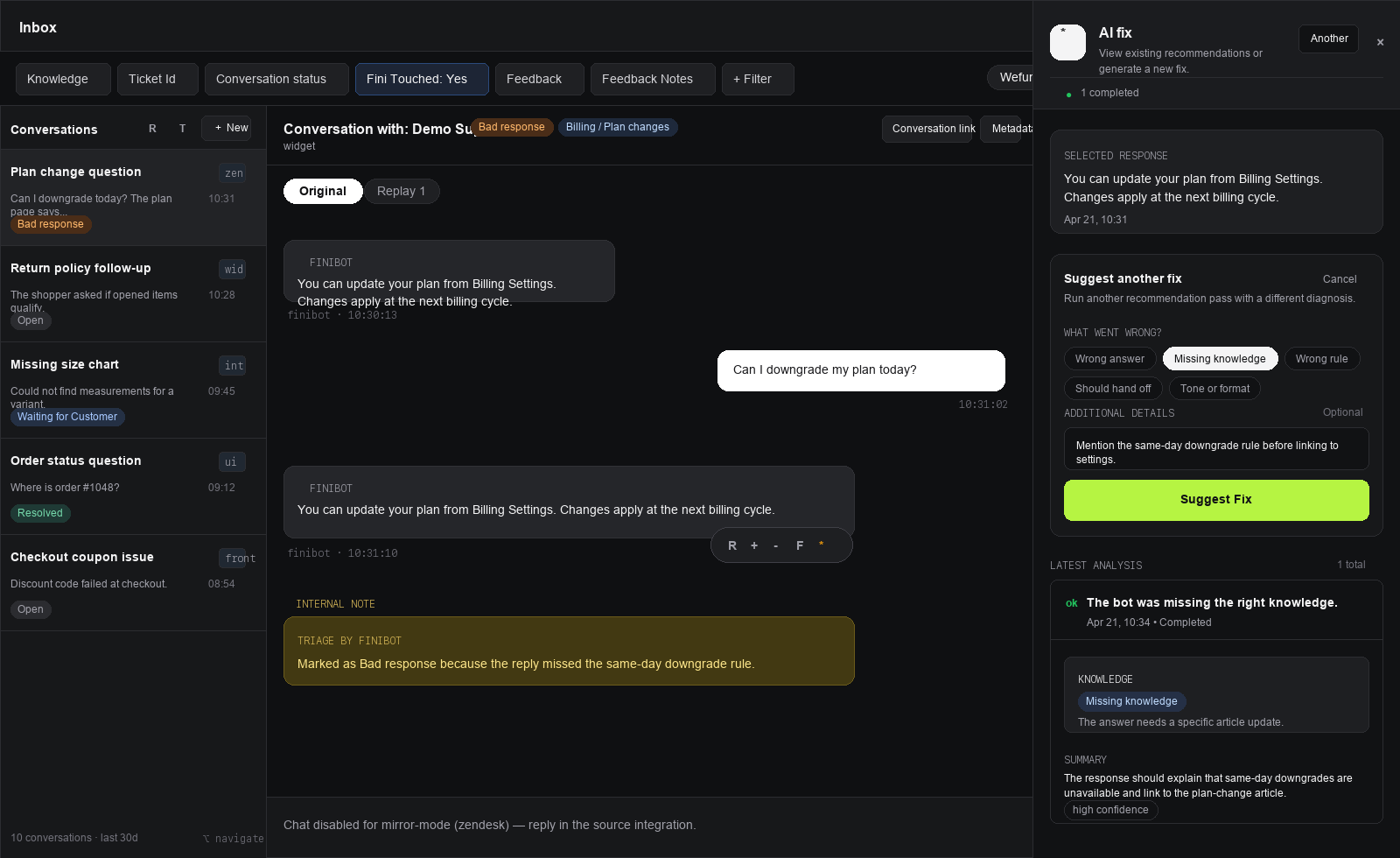 Refine with AI creates reviewable drafts. It does not publish knowledge, prompt, or rule changes automatically.
## When to use it
Use Refine with AI when a Fini reply is wrong, incomplete, off-policy, or hard to explain from the final answer alone. It is most useful after you have found a specific reply in [Inbox](/en/testing/inbox) and can describe the expected behavior in plain language.
Good examples:
* The agent missed an article that should have answered the question.
* The answer used the right article but omitted an important condition.
* The agent selected the wrong rule, skipped a required rule, or followed a rule incorrectly.
* The response strategy was wrong, such as asking for clarification when it should have escalated.
Refine with AI is not the right tool for backend bugs, integration outages, missing CRM permissions, or product behavior that cannot be fixed through prompts, knowledge, or rules.
## Start a review
Go to [Inbox](/en/testing/inbox), select the agent and date range, then open the conversation that contains the reply you want to improve.
Click the reply you want to review and open the **Improve** tab in the right-side inspector.
In **Refine with AI**, write a short feedback note that explains what the agent should have done differently. Be specific about the missing fact, wrong policy, wrong rule behavior, or expected answer.
Click **Start review**. Fini creates a review session, queues the analysis, and shows progress while it analyzes the conversation, generates changes, and replays the reply.
The feedback note is required. It can be up to 2,000 characters.
## What Fini analyzes
Fini reviews the same evidence you would inspect manually in AI Steps, plus the editable sources that could fix the problem:
* Conversation history up to the user message that caused the selected reply.
* Planning trace, including whether knowledge search or rule execution was selected.
* Knowledge search trace and retrieved articles.
* Rule execution trace, when a rule ran.
* Prompt sections and instructions active for the original reply.
* User attributes, action outputs, and answer-generation reasoning.
* The latest editable prompt, knowledge snapshot, and rule snapshots.
Fini only analyzes Fini-authored replies that can be replayed. If the selected event is not a Fini reply, belongs to another conversation, or has no linked user event, the review cannot start.
## Review results
Each review iteration moves through these states:
| Status | Meaning |
| - | - |
| `queued` | The review job has been created. |
| `generating_changes` | Fini is diagnosing the issue and drafting changes. |
| `replaying` | Fini is replaying the conversation with the drafted changes. |
| `ready` | Recommendations and replay results are available. |
| `no_change` | Fini did not find an actionable prompt, knowledge, or rule fix. |
| `failed` | The review could not complete. |
When the review is ready, the **Refine with AI** section shows:
* **Summary**: what Fini thinks caused the bad reply.
* **Response comparison**: the current reply beside the replayed reply.
* **Suggested changes**: prompt, knowledge, or rule drafts tied to the diagnosed root cause.
* **Why this change**: reasoning and evidence for each recommendation.
## Recommendation types
Fini drafts an updated prompt version or a new prompt subsection when the issue is caused by missing, incorrect, or conflicting instructions.
Fini drafts a new article or an update to an existing article when the issue is caused by missing, incomplete, incorrect, or conflicting knowledge.
Fini drafts a rule version when the issue is caused by a missing, unwanted, or misconfigured rule behavior.
Each recommendation opens in the place where it can be reviewed:
* Prompt changes open as a prompt diff preview.
* Knowledge changes open in **Reviews & Approvals**.
* Rule changes open as a drafted rule version.
Review every recommendation before publishing it. The replay shows what the draft would have changed for this one conversation, not a full regression test across every customer scenario.
## Refine a fix
If the latest result is close but not right, click **Refine fix** and add another feedback note. Fini uses the previous review, draft artifacts, and replay result as context for the next iteration.
Only one iteration can run at a time for the same reply. Older ready iterations can be superseded by a newer one.
## Lock in the improvement
After reviewing a recommendation:
1. Publish or approve the underlying prompt, knowledge, or rule change from its review surface.
2. Re-run the conversation or inspect the replay to confirm the answer improved.
3. Add the case to a [Test Suite](/en/testing/test-suite) so the behavior becomes a regression check.
4. Mark the feedback as **Actioned** in Inbox when the issue has been addressed.
## API access
The dashboard flow uses the same fix-review model exposed by the public API. These are the three endpoints to use when automating Refine with AI outside the dashboard:
* [Create fix-review iteration](/en/api-reference/create-fix-review-iteration) queues analysis and replay for one Fini response.
* [Get active fix-review session](/en/api-reference/get-active-fix-review-session) polls the active session for a response.
* [Get fix-review session](/en/api-reference/get-fix-review-session) retrieves a named session and its iteration history.
Creating a fix-review iteration requires a workspace API key with `write` scope. Reading sessions requires `read` scope.
The API loop is:
1. Use [List conversations](/en/api-reference/list-conversations) or [Get conversation](/en/api-reference/get-conversation) to find the conversation ID and the Fini response event ID.
2. Call [Create fix-review iteration](/en/api-reference/create-fix-review-iteration) with a `feedbackNote`. The response returns `sessionId`, `iterationId`, and `backgroundJobId`.
3. Poll [Get fix-review session](/en/api-reference/get-fix-review-session) with the returned `sessionId`, or poll [Get active fix-review session](/en/api-reference/get-active-fix-review-session) for the response.
4. Wait until `latestIteration.status` is `ready`, `no_change`, or `failed`.
5. For a `ready` iteration, compare `oldAnswerSnapshot.content` with `newAnswerSnapshot.content`, then inspect `changes`. Each change includes its `changeType`, the generated draft ID when one was created, and the `rootCause` that explains why Fini suggested it.
Fix-review API responses are evidence and review artifacts. They do not apply the fix. Publish or approve the underlying prompt, knowledge, or rule change through the relevant Fini review surface or public API before marking the original feedback as actioned.
## Related topics
- [API overview](/en/api-reference/overview.md)
- [Get Refine with AI session](/en/api-reference/get-fix-review-session.md)
- [Create Refine with AI iteration](/en/api-reference/create-fix-review-iteration.md)
This documentation is built and hosted on [Mintlify](https://mintlify.com), a developer documentation platform.
Refine with AI creates reviewable drafts. It does not publish knowledge, prompt, or rule changes automatically.
## When to use it
Use Refine with AI when a Fini reply is wrong, incomplete, off-policy, or hard to explain from the final answer alone. It is most useful after you have found a specific reply in [Inbox](/en/testing/inbox) and can describe the expected behavior in plain language.
Good examples:
* The agent missed an article that should have answered the question.
* The answer used the right article but omitted an important condition.
* The agent selected the wrong rule, skipped a required rule, or followed a rule incorrectly.
* The response strategy was wrong, such as asking for clarification when it should have escalated.
Refine with AI is not the right tool for backend bugs, integration outages, missing CRM permissions, or product behavior that cannot be fixed through prompts, knowledge, or rules.
## Start a review
Go to [Inbox](/en/testing/inbox), select the agent and date range, then open the conversation that contains the reply you want to improve.
Click the reply you want to review and open the **Improve** tab in the right-side inspector.
In **Refine with AI**, write a short feedback note that explains what the agent should have done differently. Be specific about the missing fact, wrong policy, wrong rule behavior, or expected answer.
Click **Start review**. Fini creates a review session, queues the analysis, and shows progress while it analyzes the conversation, generates changes, and replays the reply.
The feedback note is required. It can be up to 2,000 characters.
## What Fini analyzes
Fini reviews the same evidence you would inspect manually in AI Steps, plus the editable sources that could fix the problem:
* Conversation history up to the user message that caused the selected reply.
* Planning trace, including whether knowledge search or rule execution was selected.
* Knowledge search trace and retrieved articles.
* Rule execution trace, when a rule ran.
* Prompt sections and instructions active for the original reply.
* User attributes, action outputs, and answer-generation reasoning.
* The latest editable prompt, knowledge snapshot, and rule snapshots.
Fini only analyzes Fini-authored replies that can be replayed. If the selected event is not a Fini reply, belongs to another conversation, or has no linked user event, the review cannot start.
## Review results
Each review iteration moves through these states:
| Status | Meaning |
| - | - |
| `queued` | The review job has been created. |
| `generating_changes` | Fini is diagnosing the issue and drafting changes. |
| `replaying` | Fini is replaying the conversation with the drafted changes. |
| `ready` | Recommendations and replay results are available. |
| `no_change` | Fini did not find an actionable prompt, knowledge, or rule fix. |
| `failed` | The review could not complete. |
When the review is ready, the **Refine with AI** section shows:
* **Summary**: what Fini thinks caused the bad reply.
* **Response comparison**: the current reply beside the replayed reply.
* **Suggested changes**: prompt, knowledge, or rule drafts tied to the diagnosed root cause.
* **Why this change**: reasoning and evidence for each recommendation.
## Recommendation types
Fini drafts an updated prompt version or a new prompt subsection when the issue is caused by missing, incorrect, or conflicting instructions.
Fini drafts a new article or an update to an existing article when the issue is caused by missing, incomplete, incorrect, or conflicting knowledge.
Fini drafts a rule version when the issue is caused by a missing, unwanted, or misconfigured rule behavior.
Each recommendation opens in the place where it can be reviewed:
* Prompt changes open as a prompt diff preview.
* Knowledge changes open in **Reviews & Approvals**.
* Rule changes open as a drafted rule version.
Review every recommendation before publishing it. The replay shows what the draft would have changed for this one conversation, not a full regression test across every customer scenario.
## Refine a fix
If the latest result is close but not right, click **Refine fix** and add another feedback note. Fini uses the previous review, draft artifacts, and replay result as context for the next iteration.
Only one iteration can run at a time for the same reply. Older ready iterations can be superseded by a newer one.
## Lock in the improvement
After reviewing a recommendation:
1. Publish or approve the underlying prompt, knowledge, or rule change from its review surface.
2. Re-run the conversation or inspect the replay to confirm the answer improved.
3. Add the case to a [Test Suite](/en/testing/test-suite) so the behavior becomes a regression check.
4. Mark the feedback as **Actioned** in Inbox when the issue has been addressed.
## API access
The dashboard flow uses the same fix-review model exposed by the public API. These are the three endpoints to use when automating Refine with AI outside the dashboard:
* [Create fix-review iteration](/en/api-reference/create-fix-review-iteration) queues analysis and replay for one Fini response.
* [Get active fix-review session](/en/api-reference/get-active-fix-review-session) polls the active session for a response.
* [Get fix-review session](/en/api-reference/get-fix-review-session) retrieves a named session and its iteration history.
Creating a fix-review iteration requires a workspace API key with `write` scope. Reading sessions requires `read` scope.
The API loop is:
1. Use [List conversations](/en/api-reference/list-conversations) or [Get conversation](/en/api-reference/get-conversation) to find the conversation ID and the Fini response event ID.
2. Call [Create fix-review iteration](/en/api-reference/create-fix-review-iteration) with a `feedbackNote`. The response returns `sessionId`, `iterationId`, and `backgroundJobId`.
3. Poll [Get fix-review session](/en/api-reference/get-fix-review-session) with the returned `sessionId`, or poll [Get active fix-review session](/en/api-reference/get-active-fix-review-session) for the response.
4. Wait until `latestIteration.status` is `ready`, `no_change`, or `failed`.
5. For a `ready` iteration, compare `oldAnswerSnapshot.content` with `newAnswerSnapshot.content`, then inspect `changes`. Each change includes its `changeType`, the generated draft ID when one was created, and the `rootCause` that explains why Fini suggested it.
Fix-review API responses are evidence and review artifacts. They do not apply the fix. Publish or approve the underlying prompt, knowledge, or rule change through the relevant Fini review surface or public API before marking the original feedback as actioned.
## Related topics
- [API overview](/en/api-reference/overview.md)
- [Get Refine with AI session](/en/api-reference/get-fix-review-session.md)
- [Create Refine with AI iteration](/en/api-reference/create-fix-review-iteration.md)
This documentation is built and hosted on [Mintlify](https://mintlify.com), a developer documentation platform.