

fini_escalated_human_agent, and Front can also receive Fini widget escalations; Fini’s app is listed on the Front App Store.
Connect Fini to Front so your AI agent can read incoming conversations across your email and chat inboxes, draft replies, and respond on the inboxes you choose. Configuration lives entirely on the Fini side once Front is authorized: agent-to-inbox mapping, reply timing, and reply-behavior rules are all set from the Front deploy page.
At a glance
Two deployment modes.
- Full Front integration (Fini replies on incoming Front conversations): the entire page below applies, including Agent Routing and Reply Settings.
- Widget-only deployment (Front is just a destination where the Fini widget escalates conversations): authorize the OAuth connection on this page, then configure the escalation channel under Widget → Escalate to Front instead. You can skip Agent Routing and Reply Settings here.
Before you connect
You’ll need:- A Front account with permission to install third-party apps. Typically a company admin or a teammate with App Marketplace permissions.
- The email address of the teammate Fini should act as when posting replies. Fini looks this teammate up in your Front workspace during authorization.
- At least one agent already created in Fini. If you haven’t created one yet, do that first from Agent home.
Front routes conversations into inboxes. If your team uses multiple inboxes (one per product, region, or channel), you can map a different Fini agent to each inbox. Single-inbox setups can leave the inbox selection empty and let one agent respond to everything.
What Fini does with your Front
The OAuth scopes Fini requests are managed in Front’s app configuration. Front shows the full permission list on the consent screen during authorization. The operations Fini performs on your workspace:- Read teammate identity: looks up the Front teammate you specified by email so Fini knows which user to act as.
- Read conversations, messages, and comments: required so the agent can understand context and compose replies.
- Post replies as messages or comments: as the authorized teammate, when a mapped agent decides to respond.
- Read and create tags: Fini creates and uses Front tags to mark conversation state:
fini_escalated_human_agent,fini_resolved, andfini_waiting_for_customer. Fini also createsFini Skip Webhookso you can opt specific conversations out of automated processing. If tags with these names already exist, Fini reuses them.
Connect Front
When you first open the Front deploy page, you’ll see an Authorize Integration button. Front uses pure OAuth, so there’s no subdomain or credentials to enter ahead of time.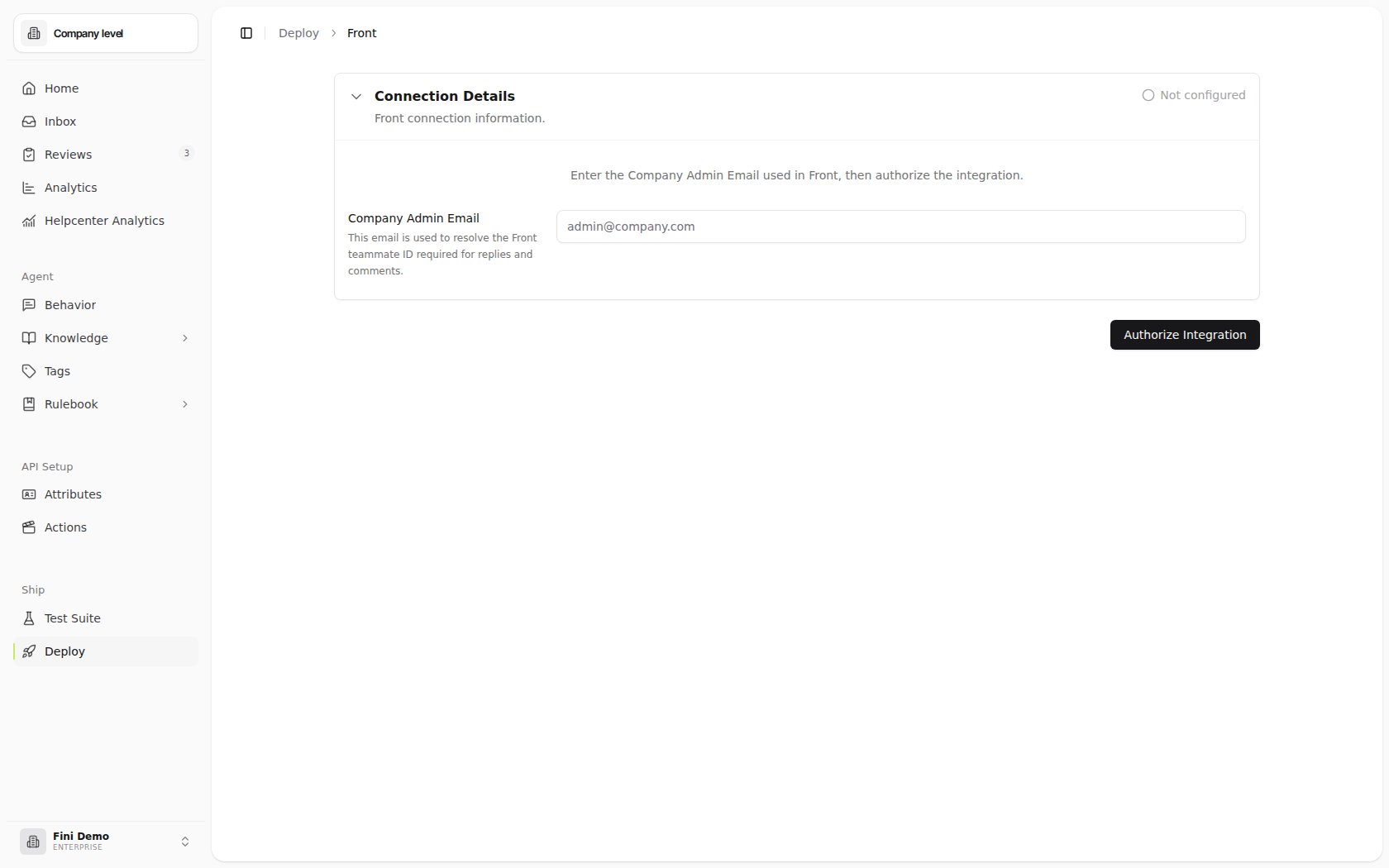
1
Click Authorize Integration
A Front authorization window opens. Sign in with an account that has permission to install apps in your Front workspace.
2
Approve the requested permissions
Front shows the permission list Fini requests. Review and approve.
3
Return to Fini
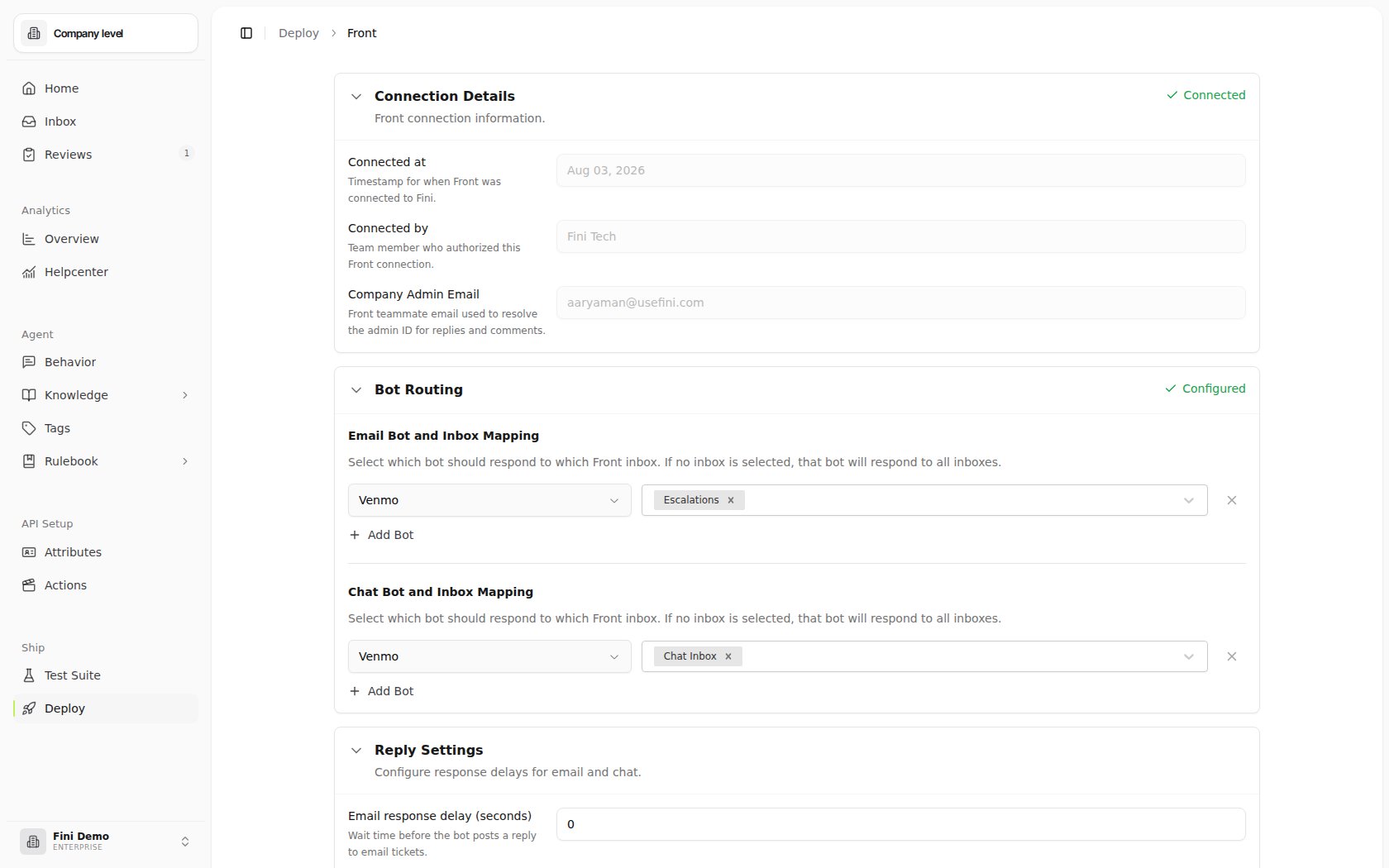
Once Front redirects you back, the page expands to show your connection metadata and the Agent Routing and Reply Settings sections appear.
Configure your deployment
After connecting, three sections appear on the Front deploy page. Each is independent. You can configure them in any order.Connection Details
Read-only metadata about the integration:- Connected at: the timestamp of the most recent successful authorization.
- Connected by: the team member whose Front account authorized the integration.
Agent Routing
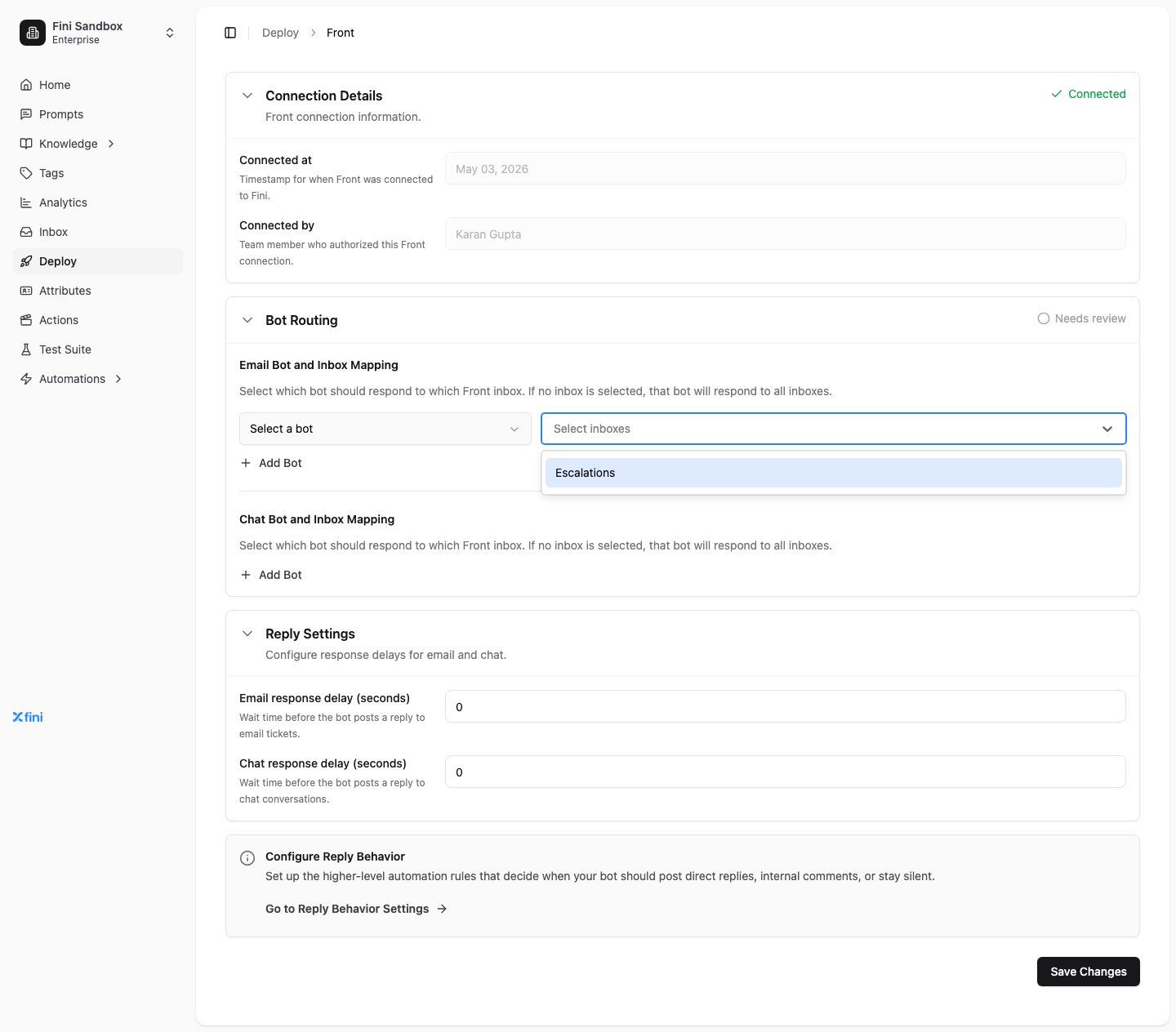
Decides which Fini agent replies on which Front inbox, separately for email and chat. For each channel (Email Agent and Inbox Mapping, Chat Agent and Inbox Mapping):- Click Add Agent to create a new mapping row.
- In the new row, click Select an agent and pick the Fini agent that should respond.
- Click Select inboxes and select the Front inboxes that agent should respond to.
How Fini routes conversations at runtime
When a conversation reaches Fini, Front’s webhook payload includes the inbox the message arrived on. Fini matches that inbox ID against the agent routing you configured:- Looks for an explicit mapping where the inbox is in the agent’s
Select inboxeslist. If found, that agent responds. - If no explicit match, falls back to the wildcard agent (the one you mapped without selecting any inboxes).
- If no wildcard either, the conversation gets no reply.
Reply Settings
Controls when Fini posts a reply and whether direct replies assign the conversation back to Fini.- Email response delay (seconds): wait time before the agent posts on email conversations.
- Chat response delay (seconds): wait time before the agent posts on chat conversations.
- Assign conversations to Fini on direct reply: when enabled, Fini assigns the Front conversation to Fini only when the agent sends a direct reply. Leave it enabled if your team wants Front ownership to move to Fini after the agent visibly replies; turn it off if assignment should stay with the current Front teammate or inbox owner.
0 makes the agent reply as soon as it has an answer. Higher values can make the agent feel less robotic, or give human agents a chance to take over first.
Configure reply behavior
Reply Behavior is the higher-level rule layer that decides when the agent should post a direct reply, leave an internal comment, or stay silent. Click Go to Reply Behavior Settings on the Front page to configure these rules. They apply across all channels, not just Front.Skip a specific conversation
Front conversations can be opted out of Fini processing without disabling the integration: tag the conversation withFini Skip Webhook in Front. Fini checks for this tag on every incoming event and skips reply processing when it’s present.
This is useful when:
- An agent is actively handling a conversation and doesn’t want the agent to interject.
- A conversation is a test or a duplicate that shouldn’t trigger automated responses.
- You’re triaging a conversation manually before deciding whether the agent should be involved.
Fini Skip Webhook tag and Fini’s conversation-status tags are created automatically during authorization (if they don’t already exist).
Verify it’s working
- From your connected Front workspace, send a test message to one of the inboxes you’ve mapped.
- Wait the configured response delay, then check the conversation. The mapped Fini agent should have posted a reply.
- If nothing appears, see Troubleshooting.
Common questions
Do I need to replace Front or migrate my conversations?
Do I need to replace Front or migrate my conversations?
No. Fini connects to your Front workspace over OAuth and replies as the teammate you choose, on conversations where they already are. See Fini on top of your helpdesk.
What does Fini do when it can't answer?
What does Fini do when it can't answer?
It escalates the conversation to your team and applies the
fini_escalated_human_agent tag, so your team can find it in Front. You can review what the agent tried in Inbox.Does Fini read internal comments?
Does Fini read internal comments?
Yes. Fini reads conversations, messages, and comments for context, and it can post as a comment instead of a reply when an Internal Comment rule in Reply Rules matches.
Will Fini reply while a human agent is working the conversation?
Will Fini reply while a human agent is working the conversation?
Not if you tell it not to. Add a No Reply rule in Reply Rules with Human Agent Assigned equal to
True. A higher response delay in Reply Settings also gives your team a chance to take over first.How do I keep Fini off a conversation, or off Front entirely?
How do I keep Fini off a conversation, or off Front entirely?
Tag a single conversation
Fini Skip Webhook (Skip a specific conversation). To pause Fini on all Front traffic, add a No Reply rule with Integration Provider equal to front.Troubleshooting
Authorization failed or expired. Click Authorize Integration again from the Front deploy page. Make sure you’re signing in with a Front account that has app-installation permission for the workspace. The agent isn’t replying. Check, in order:- Is an agent mapped to the inbox the conversation came in on? (Empty inbox selector = “wildcard / all inboxes”; an explicit inbox list excludes everything else.)
- Does the conversation have the
Fini Skip Webhooktag? If so, Fini deliberately skips it. - Is the agent enabled and trained?
- Is the response delay much higher than expected?
- Are there Reply Behavior rules that suppress replies on this channel or conversation type?
Select inboxes list per channel.